
_MolcaDT).
Script: Assets/_MolcaSDK/_VR/Scripts/Scenario/Data/ScenarioDataConfig.csType:
SettingModule (listed on GlobalSettings)
When to use
Use this module whenever scenario selection/content resolution is needed in VR runtime (local scenario assets, fetched scenario metadata, execution/player mode switches).Role
- Holds
ScenarioCollectionentries (localBaseScenarioDataassets). - Stores execution mode (
ScenarioExecutionMode) and player mode — standalone vs connected; connected expects Scenario session + valid network config. - After a content fetch, supports lookup by organization scenario id and related org metadata (see source for
SetFetchedContent/FetchedScenarios). - Resolves scenario scenes via
SceneLoadPlan— each scenario has asinglePlayerPlanand optionalroleSceneMappingsfor multiplayer. The plan executor loads preload scenes (environment, shared assets) before the main scenario scene, waiting for RefId registrations between each.
Lookup helpers
GetScenarioDataByName, GetScenarioData(string scenarioId), GetScenarioDataByScenarioId, GetScenarioDataByOrgId, etc. — confirm signatures in the .cs file.
Troubleshooting
- Scenario not found by id/org id: verify scenario collections are assigned and fetched content has been set before lookup.
- Connected mode fails at runtime: check Scenario network config endpoints and auth/session flow.
- Wrong mode behavior: confirm
ScenarioExecutionModeand player mode values on the module asset in the activeGlobalSettings. - Scene doesn’t load: verify the
SceneLoadPlanis configured — check thatscenarioScenehas eithersceneNameorsceneReferenceset. For Addressables, confirm the scene is marked as Addressable and the key is valid. - Preload scenes load out of order: preload scenes load sequentially by array index. Index 0 always loads as Single (active scene); subsequent entries load Additive.
- Scene loads but objects missing: check
waitForRefIdson preload scenes — the executor waits for those RefIds to be registered inReferenceManagerbefore loading the next scene. Timeout is 15 seconds; check console for warnings.
Related
- Scenario Data — ScriptableObject asset that defines scenario metadata and scene loading
- Recipe: Set up a VR scenario — step-by-step guide for creating a complete VR training scenario
- VR assets and scenes — how catalog data relates to Unity scenes
- Session loading and events
- New scenario quick start
- Scenario manager
Unity Editor
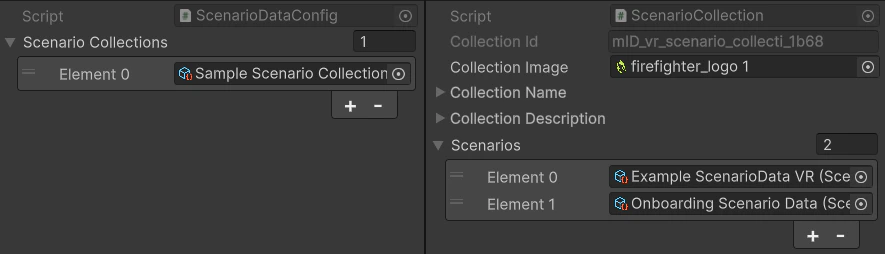
ScenarioDataConfig — scenario collections and execution mode