
Shared module
Folder:Assets/_MolcaSDK/Code/Scripts/Preload/Namespace:
MolcaSDK.Preload
When to use
UsePreloadCheck for a dedicated preload scene: branding splashes, sequential gates (EULA, device, token, content), then load the main scene and optionally unload the preload scene. Use VRPreloadCheck for the same child-list pattern in VR bootstrap scenes (e.g. with DeviceManager).
VR
VRPreloadCheck — Assets/_MolcaSDK/_VR/Scripts/UI/VRPreloadCheck.cs — same child IPreloadCheck pattern for Preload VR scene.
Code
Each gate implementsIPreloadCheck and runs async work in RunCheck() (see FirstLaunchCheck in the same folder):
PreloadCheck / VRPreloadCheck in the Hierarchy so customChecks list order matches your intended gate sequence (Inspector order is sequential — not child transform order unless you copy that into the list).
Troubleshooting
- Check never runs — The component must be listed under
customChecksonPreloadCheckand implementIPreloadCheck; otherwise you get “does not implement IPreloadCheck” warning and it is skipped. - Stuck on splash —
RunSplashScreensAsync/ fade may hang ifCanvasGroupreferences are wrong orholdDurationextreme;backgroundmust be valid forFadeOut. - Next scene wrong —
autoLoadNextSceneusesLoadNextSceneWithCallbackfromSceneLoadManager— verify Molca scene flow / queue configuration. - VR duplicate logic — Prefer DeviceManager as
IPreloadCheckviaDeviceCheckrather than duplicating HTTP in a randomMonoBehaviour.
Related
- RuntimeManager
- DeviceManager
- DT startup flow — broader app bootstrap patterns where applicable
Unity Editor
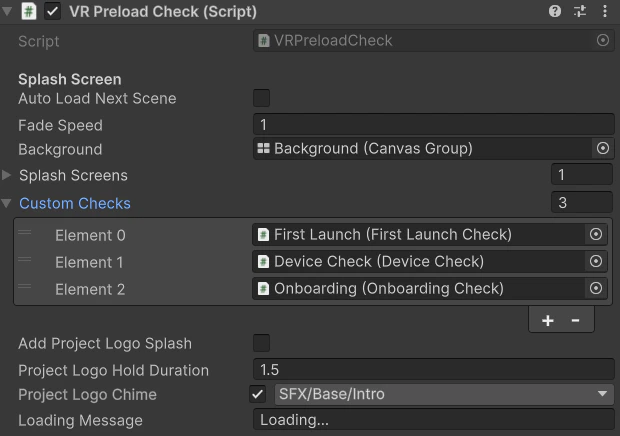
Preload scene with VRPreloadCheck children