
MolcaFile:
Packages/com.molca.core/Runtime/RuntimeManager.cs
When to use
RuntimeManager is the single bootstrap entry point for every Molca-based project. You interact with it when:
- Waiting for initialization before accessing any service or subsystem (always call
await RuntimeManager.WaitForInitialization()before resolving services). - Registering or resolving services through the built-in DI container (
GetService<T>,RegisterService<T>). - Injecting dependencies into runtime-created objects that missed the automatic scene injection pass.
- Creating factory-produced instances with constructor + field injection via
CreateWithInjection<T>.
Bootstrap
After scene load, static initialization loads Molca Project Settings, instantiates the configured RuntimeManager prefab, callsDontDestroyOnLoad, then runs async InitializeAsync: GlobalSettings load, subsystem discovery, service registration, scene-wide dependency injection, then IsReady.
Using from code
Service API
PreferGetService<T>() / TryGetService<T>(). For RuntimeSubsystem types, GetSubsystem<T>() still resolves the same instance but is labeled legacy in source comments.
Troubleshooting
- Services/subsystems are null in
StartorAwake: callawait RuntimeManager.WaitForInitialization()before resolving.[Inject]fields arenulluntil the injection pass completes. MolcaProjectSettings failed to load: ensure aMolcaProjectSettingsasset exists underResources/and theRuntimeManagerprefab field is assigned.Multiple instances of subsystem typewarning: only one enabled component of eachRuntimeSubsystemtype should exist on the prefab. Duplicates are automatically removed.- Dynamically created objects have null
[Inject]fields: callRuntimeManager.InjectInto(component)afterInstantiate/AddComponent— the automatic scene pass only runs once during init. - Circular dependency detected: two services depend on each other during resolution. Refactor one to use lazy resolution or event-based decoupling.
Related
- Runtime subsystem — child components on the prefab
- Dependency injection —
[Inject] - Molca Project Settings — configures the RuntimeManager prefab reference
- EventDispatcher — dispatches
TypedEvents.ApplicationInitializedafter init
Unity Editor
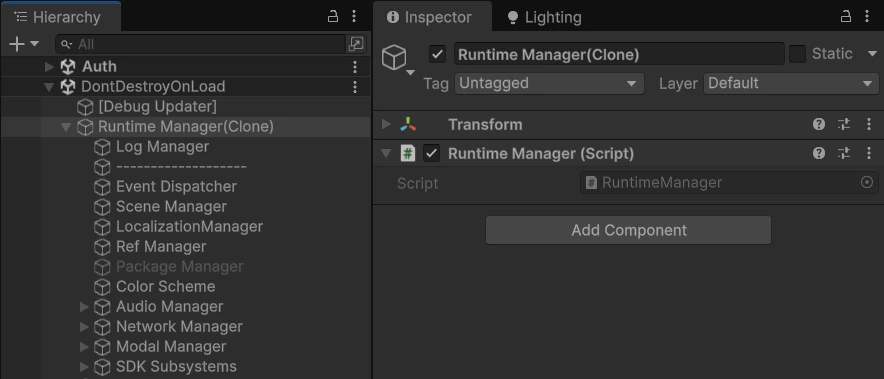
RuntimeManager prefab instance (DontDestroyOnLoad) in Hierarchy and Inspector