
Packages/com.molca.core/Runtime/RuntimeSubsystem.csBase for:
ModalManager, ScenarioSessionManager, VRFadeManager, GameManager, TourSubsystem, etc.
When to use
SubclassRuntimeSubsystem when you need a cross-scene service that:
- Must initialize before gameplay code runs (controlled by
InitializationPriority). - Should be registered in the DI container automatically for
[Inject]andGetService<T>resolution. - Needs lifecycle hooks (initialize → activate → deactivate → shutdown) tied to
RuntimeManager.
MonoBehaviour with [Inject] instead.
Lifecycle
Initialize(Action<IRuntimeSubsystem> finishCallback)— must invoke the callback when finished.Activate()/Deactivate()— default togglesisActive.Shutdown()— default callsDeactivate().
RuntimeMode
Serialized flags can restrict a subsystem to Editor and/or Player so tooling components do not run in builds.InitializationPriority
RuntimeManager sorts subsystems in descending order: higher numeric InitializationPriority runs first.
Placement
Add each subsystem once as an enabled child component on the RuntimeManager prefab. Duplicate component types are detected and duplicates removed with a warning.Using from code
API Reference
Troubleshooting
- Subsystem never initializes: ensure
finishCallbackis invoked —RuntimeManagerawaits it with a 20-second timeout. - Subsystem runs in builds but shouldn’t: set
RuntimeModeto Editor on the component to exclude it from player builds. GetSubsystem<T>()returns null: the subsystem must be an enabled child of the RuntimeManager prefab (or registered viaRuntimeManager.RegisterSubsystem).
Unity Editor
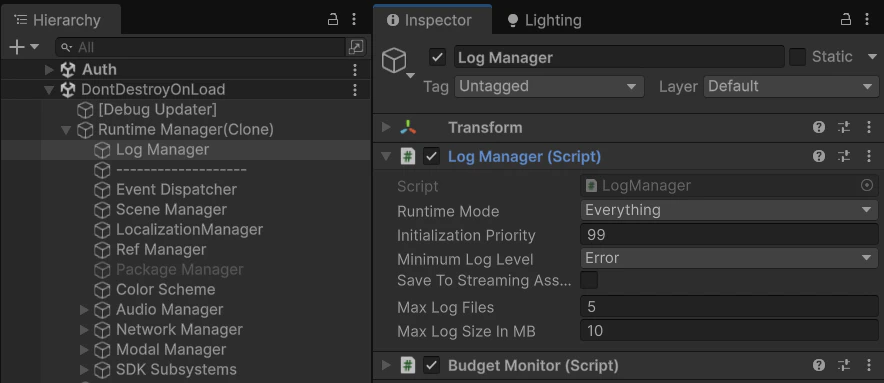
RuntimeManager prefab — child RuntimeSubsystem components and their priorities