
Assets/_MolcaSDK/Code/Scripts/GameManager.csNamespace:
MolcaSDKType: RuntimeSubsystem (child on RuntimeManager prefab)
When to use
UseGameManager when you want global handling of HTTP connection errors from HttpClient: one place to show a localized connection failure modal instead of teaching every screen to catch OnConnectionError. It does not replace scene bootstrapping — only connection UX.
Role
SetsInstance during Initialize, subscribes to HttpClient.OnConnectionError, and when enableConnectionFailConfirmation is on, pushes the error string into ModalConfirmationHelper (default language via LocalizationManager.DefaultLanguageCode) after a short delay.
Code
GameManager.Instance only after RuntimeManager has finished subsystem initialization. Calling Instance before init logs “GameManager is not initialized!” and still returns null reference behavior risk — prefer RuntimeManager.GetSubsystem<GameManager>() if you need a safe null check.
Troubleshooting
- Modal never appears — Enable
enableConnectionFailConfirmation, assignconnectionFailConfirmation, and confirmHttpClientactually raisesOnConnectionErrorfor your failure (some paths may only set response flags). - Spam or wrong copy — Message text is whatever the client passes; trim at source if user-facing strings are too technical.
- Double
GameManager—Initializewarns if already initialized; ensure a single subsystem instance on the prefab.
Related
Unity Editor
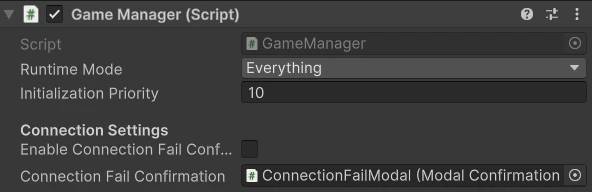
GameManager Inspector