
Packages/com.molca.core/Runtime/Modals/ModalManager.csType:
RuntimeSubsystem (child of RuntimeManager prefab)
When to use
UseModalManager for built-in modal types (message toasts, confirmation dialogs, loading overlays). For product-specific or complex modals (text input, selection, progress with custom UI), see Shared modals.
Role
Shows informational messages, confirmations, loading overlays, and typed modals by key. Prefabs and canvas wiring are assigned on the subsystem component in the Inspector viaModalEntry[] keyed entries.
Code
ModalManager.Instance only after RuntimeManager has created the subsystem (e.g. after await RuntimeManager.WaitForInitialization()).
API Reference
Messages
Loading overlays
Modals
Confirmations
Troubleshooting
- Modal does not appear: confirm
ModalManager.Instanceis not null — the subsystem must exist on the RuntimeManager prefab and runtime must be initialized. - Modal appears behind other UI: check canvas sort order; ModalManager typically uses a high-priority canvas.
ShowModal(string modalKey)returns null: ensure aModalEntrywith the matching key exists in the ModalManager component’smodalPrefabslist in the Inspector.- Loading overlay persists: call
RemoveLoading(title)orHideFullScreenLoading()explicitly — overlays are not auto-removed.
Related
- Shared modals — product-specific modal types (text input, selection, progress)
- RuntimeManager —
ModalManageris a child subsystem - Localization — modals with localized text
Unity Editor
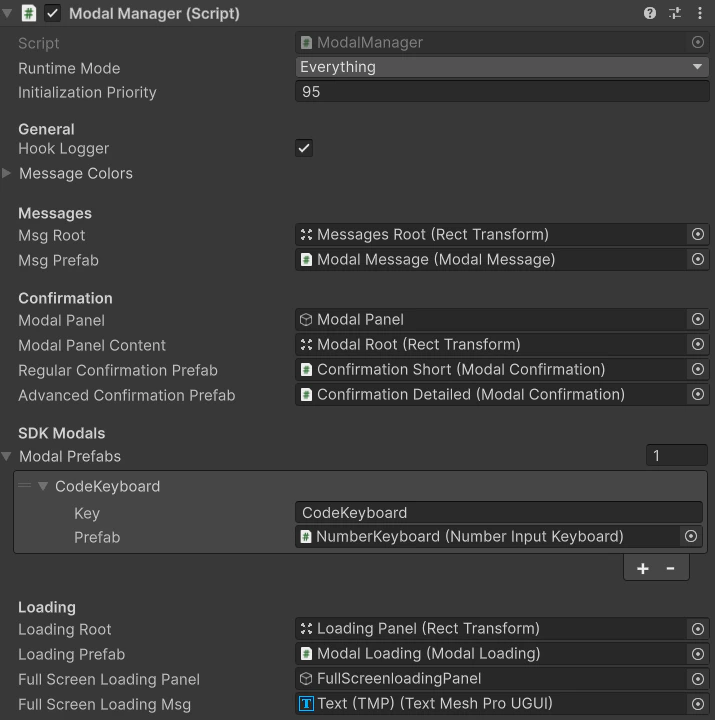
ModalManager — modal prefabs and settings