
Packages/com.molca.core/Runtime/Localization/Namespace:
Molca.Localization
Core localization combines Unity Localization tables with Molca runtime helpers:
LocalizationModule(SettingModule) stores supported languages and active language code.LocalizationManager(RuntimeSubsystem) bridges locale switching, text refresh, and dynamic runtime entries.LocalizedTextandDynamicLocalizationare component/field helpers for UI text flows.
LocalizationModule (SettingModule)
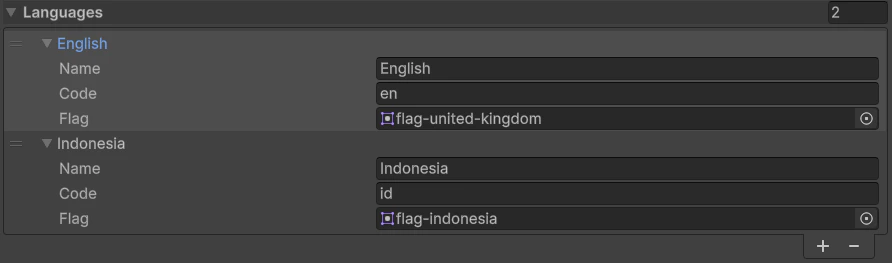
File: LocalizationModule.csCreate asset: Molca → Settings → Localization
Languages: array of language entries (name,Code,Flagsprite).ActiveLanguageis persisted in module settings (SaveSettings/LoadSettings).- Runtime helpers:
LanguageCode,ActiveLanguageEntry,GetFlagForLanguage(code).
LocalizationManager (RuntimeSubsystem)
File: LocalizationManager.cs
Place on the RuntimeManager prefab. During initialize it waits for Unity Localization initialization, loads the active language from LocalizationModule, then applies it through LocalizationSettings.SelectedLocale.
- Language switch API:
LocalizationManager.SetLanguage(langCode) - Refresh path: locale change triggers
TypedEvents.LanguageChanged.Dispatch(...)and refreshes registered localized texts. - Dynamic table key:
Dynamic(used byUpdateEntry/GetLocale). - Also exposes helpers:
GetLocalizedString(collectionName, entryKey)andGetLocalizedStringAsync(key).
LocalizedText (TMP component)
File:LocalizedText.csRequirement:
TextMeshProUGUI
LocalizedText registers itself with LocalizationManager, subscribes to LocalizedString.StringChanged, then updates TMP text and rebuilds layout. Optional LocalizedTextStyleInfo assets (see Styles/) apply font/size presets.
DynamicLocalization (serializable field helper)
Files:DynamicLocalization.cs, DynamicLocalizationEntry.cs
Use for runtime-managed strings (e.g. content loaded from API or generated labels):
- Supports direct
LocalizedStringmode or per-language fallback list. Init(key)syncs entries into the runtimeDynamictable throughLocalizationManager.UpdateEntry(...).GetLocalizedString()resolves current language with fallback to local entries/default language.
Code
Switch language from UI:LocalizedString to a LocalizedText component:
Related
- Global Settings — register
LocalizationModule - EventDispatcher — locale changes dispatch via
TypedEvents.LanguageChanged - UI widgets —
LanguageDropdownintegrates withLocalizationManager.SetLanguage(...)
Unity Editor
Localization settings and runtime components