
Packages/com.molca.core/Runtime/Networking/Http/HttpClient.csPackages/com.molca.core/Runtime/Networking/Http/HttpRequestAsset.cs
When to use
HttpRequestAsset(recommended) — for data-driven endpoints where URL, method, headers, and body templates live in a ScriptableObject. Best for stable API calls configured once in the Inspector.HttpRequestBuilder(programmatic) — for dynamic endpoints or when URL/body must be built at runtime. Uses a fluent builder API.- Both route through the same
HttpClientsubsystem with queuing, concurrency control, and connection error events.
HttpClient
RuntimeSubsystem — async HTTP with request queuing, auth header management, and event hooks.
⚠️ The staticHttpClient.*API is deprecated. All static members (SendAsync,Send,CreateRequest,BaseUrl, events, etc.) are marked[Obsolete]. Use theIHttpClientinstance interface instead:Or inject via[Inject] IHttpClient http;
IHttpClient (recommended)
Events:
RequestStarted, RequestCompleted, RequestFailed, ConnectionError (instance event Action).
Legacy static API (deprecated)
The following static members onHttpClient still compile but are [Obsolete] — migrate to the IHttpClient instance pattern above.
HttpRequestAsset
ScriptableObject describing URL, method, headers, and body templates. Create via Molca → Networking → HTTP Request.Code
From aHttpRequestAsset (recommended when the request is mostly data-driven):
IHttpClient):
API Reference
IHttpClient (instance API)
See the IHttpClient table above. Resolve via:HttpRequestAsset
HttpRequestBuilder
Troubleshooting
- Request fails silently: subscribe to
HttpClient.OnRequestFailedorOnConnectionErrorfor diagnostics. The request may have been queued but not started ifMaxConcurrentRequestsis exceeded. - Auth header missing on requests: call
HttpClient.AddDefaultHeader("Authorization", "Bearer " + token)after login. Default headers are applied to all future requests automatically. - Wrong base URL:
BaseUrlcomes fromHttpModuleon Global Settings. If the module is missing, URLs must be absolute (setuseFullUrl = trueor useFullUrl()on the builder). - Request validation fails:
HttpRequestAsset.Validate(out errors)will returnfalseif the URL is empty or malformed. Check theerrorsarray for specifics.
Related
- DataManager — for persistent data providers rather than one-off requests
- Scenario network config — VR session HTTP endpoints
- Global Settings —
HttpModulebase URL and defaults - Recipe: Integrate HTTP requests with data persistence — step-by-step guide to combining HttpClient and DataManager for API calls with local caching
Unity Editor
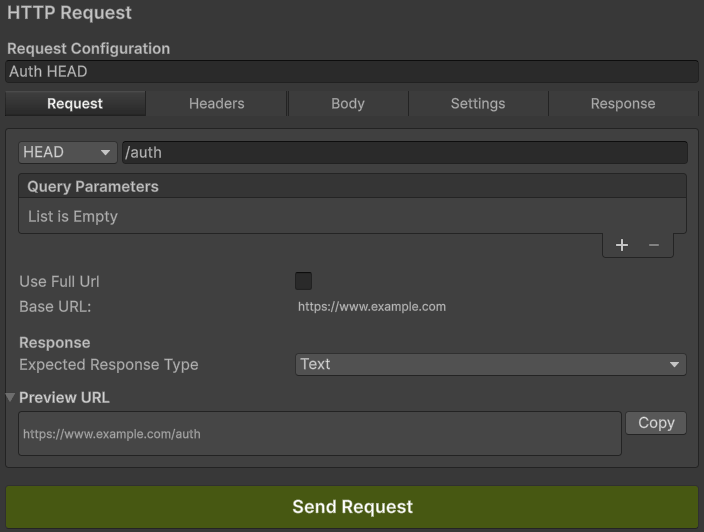
HttpRequestAsset — endpoint definition in Inspector