
When to use
Use the content package stack when you need downloadable or remotely updated content (scenarios, bundles, or other Addressables-driven payloads) that should integrate with Molca’s runtime package service and editor tooling. Reach forPackageSubsystem / IPackageService after RuntimeManager has finished initializing—not for one-off HTTP downloads (see HttpClient) or general asset loading with no manifest lifecycle.
Molca Core
Folder:Packages/com.molca.core/Runtime/ContentPackage/ — download queue, manifest cache, package state, and related services. Use when shipping downloadable scenario or asset bundles.
Editor notification
Assets/_MolcaSDK/Code/Scripts/Editor/AddressablesBuildNotificationProvider.cs — ties Addressables builds into Molca editor notifications (verify behavior in your Unity version).
Code
Runtime work goes throughPackageSubsystem on the RuntimeManager prefab:
ContentPackageSettings via Global Settings (module on the GlobalSettings asset).
Troubleshooting
PackageSubsystemorPackageServiceis null — Ensure the RuntimeManager prefab includesPackageSubsystem, the scene has completedRuntimeManager.WaitForInitialization(), and you are querying the subsystem from play mode (or after async init), not from a[RuntimeInitializeOnLoadMethod]that runs before the prefab exists.- Downloads never start or queue looks stuck — Confirm
ContentPackageSettingson Global Settings, Addressables labels/paths, and platform build output match what the service expects; check the Unity console and any package-specific logs in the ContentPackage implementation. - Wrong or missing bundle after an Addressables build — Run a clean Addressables build, verify remote catalog URLs and profile settings, and confirm
AddressablesBuildNotificationProviderbehavior for your Unity/Addressables version (see Editor notification above). - Content loads in Editor but not in player — Compare Addressables Play Mode Script vs standalone build configuration, CCD/remote hosting, and that initialization order still awaits
WaitForInitialization()before usingPackageService.
Related
- RuntimeManager — bootstrap; resolve
PackageSubsystemwithGetSubsystem - Global Settings —
ContentPackageSettingsmodule - HttpClient — ad hoc HTTP, not the package manifest pipeline
- Data manager — app data layer versus Addressables packages
- Recipe: Load and use content packages — step-by-step guide to loading Addressable content packages at runtime
Unity Editor
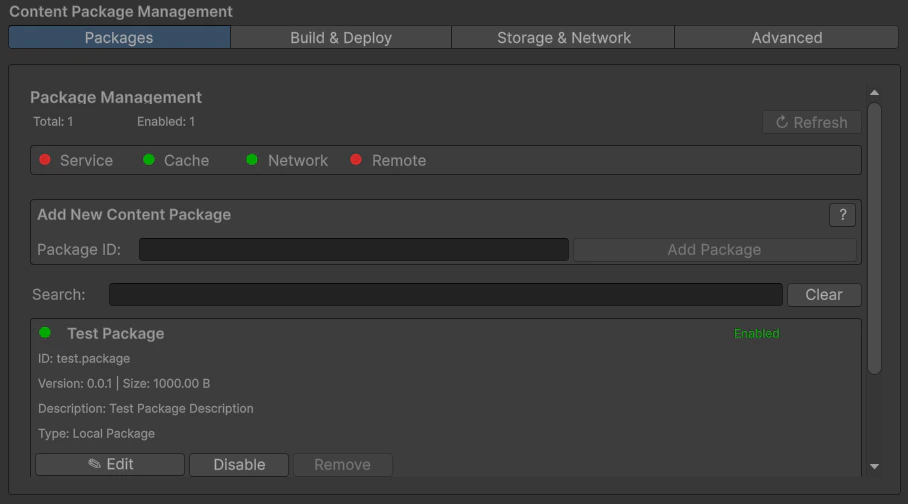
Addressables / content package tooling