
Assets/_MolcaSDK/Code/Scripts/UI/
Examples: ColorIDButton, ColorIDButtonGroup, BillboardUI, ProgressBarUI, LanguageDropdown, PasswordField, CodeInputPanel, BatteryStatus, CanvasScaleListener, UIScaleOption.
When to use
Use shared UI widgets when you need reusable, scene-agnostic UI behavior (button states, language selection, billboard labels, progress indicators) without duplicating custom MonoBehaviours per canvas.Inspector setup
- Add widget components under your UI canvas/prefab.
- For language flows, wire
LanguageDropdownand ensure Localization is configured in Global Settings. - For theme-aware buttons, keep ColorID configured on the same object (required by
ColorIDButton).
Code
ColorIDButton and related widgets are script-driven with inspector hooks:
Troubleshooting
- Colors not updating: verify
ColorIDexists on the same object (ColorIDButtonhasRequireComponent); theme changes require ColorSchemeManager / init if you rely on scheme events. - Language dropdown empty: confirm
LocalizationModule.Languagesis populated andRuntimeManagerfinished initialization. - Widget not reacting in play mode: check
GraphicRaycaster/EventSystem and interactable flags on target widget; world-space canvases need the correct event camera and Sorting Layer. - BillboardUI jitter or wrong facing: confirm reference camera / XR rig; disable conflicting
LookAtscripts on the same transform. - CodeInputPanel / PasswordField validation: ensure submit button wires to the panel’s validation flow; VR canvas scale can shrink touch targets — check Canvas Scaler and colliders for world UI.
- ProgressBarUI stuck: driven by code or animator — verify the value property your binder writes to matches the widget’s expected range (0–1 vs 0–100).
- BatteryStatus inaccurate: platform-dependent; editor often reports placeholder values — test on device.
Related
Unity Editor
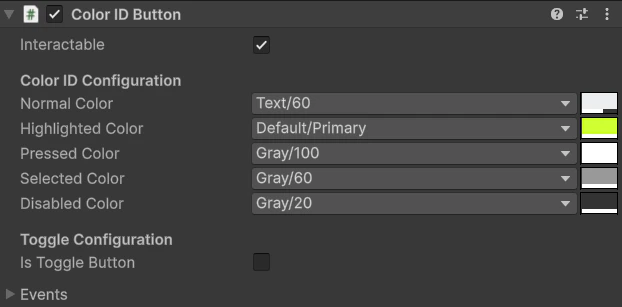
Shared UI widget Inspector