
Assets/_MolcaSDK/Code/Scripts/Media/
UI:
UI/MediaPreviewUI, MediaInfoCycle under Code/Scripts/UI/.
When to use
UseMediaLoader when you need authenticated download + cache for images, documents, or video URLs exposed by your backend, with optional loading modal progress via Modal manager. Not a substitute for raw Addressables or local Resources for built-in assets.
Code
MediaLoader is a RuntimeSubsystem; it requires AuthManager.IsAuthenticated for GetTexture (returns null if logged out). It uses HttpRequestAsset fields (getTexture2DRequest, getDocumentRequest, getVideoRequest) and CacheManager with version / cacheId.
MediaLoader.cs for document/video helpers and parity with the Inspector-configured request assets.
Troubleshooting
- Always null texture — User must be logged in (
AuthManager.IsAuthenticated); URL must be non-empty;getTexture2DRequestmust be assigned. - Stale image after CDN update — Bump
versionsoCacheManager.TryGetCachemisses old bytes; or changecacheId. - Warning on init — Any of the three
HttpRequestAssetreferences missing logs “Some HTTP request assets are not configured”; wire all three for production. - 401 / download errors — Request sets
BearerfromAuthToken; renew session if tokens expire mid-session.
Related
- HttpClient / HttpRequestAsset patterns
- Modal manager
- RuntimeManager
Unity Editor
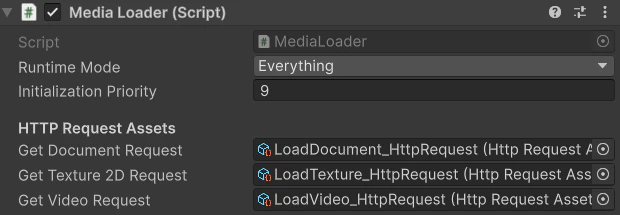
Media components