
Packages/com.molca.core/Runtime/Networking/Data/DataManager.cs
When to use
UseDataManager instead of one-off HttpClient calls when you need:
- Persistent data providers that continuously feed data (HTTP polling, SSE, WebSocket patterns).
- Centralized caching with configurable duration and max size per provider.
- Model subscriptions — get notified when new data arrives for a specific
DataModel, with automatic batching to reduce callback frequency. - Multiple data sources coordinated through a single gateway with provider registration/deregistration.
API
Provider management
Data subscription and access
Events:
OnDataUpdated, OnDataProviderRegistered, OnDataProviderUnregistered (static event Action).
Code
Subscribe to model updates (recommended for live data):DataManager.Instance (RuntimeManager.GetSubsystem<DataManager>()).
API Reference
Cache and data pool management
Utility methods
Troubleshooting
- Subscribed but no callbacks firing: verify the
DataModel.ModelIdmatches between the provider’s mapping and your subscription. EnableDataConfig.LogDataOperationsto see subscription/flush logs. - Data arrives but view is stale:
DataManagerbatches data into pools flushed every ~100ms. CallFlushAllDataPools()if you need immediate processing. Also confirm you’re subscribing to the correctDataModelinstance. - Provider not found:
RegisterDataProvidermust be called beforeFetchData. Check that the provider’sProviderIdmatches and the mapping /DataModelis assigned. - Cache grows unbounded: configure
DefaultMaxCacheSizeandDefaultCacheDurationon theDataConfigmodule in Global Settings.
Related
- HttpClient — underlying transport for HTTP-based providers
- Global Settings —
DataConfigmodule for cache and logging settings - EventDispatcher — alternative pub/sub for simple notifications
- Recipe: Integrate HTTP requests with data persistence — step-by-step guide to combining HttpClient and DataManager for API calls with local caching
Unity Editor
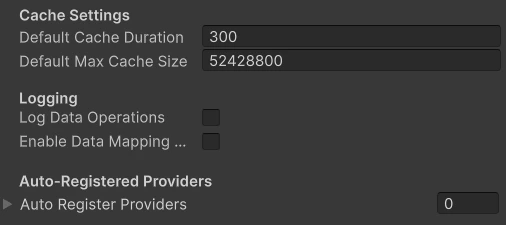
DataManager module configuration