Documentation Index
Fetch the complete documentation index at: https://docs-unity.molca.id/llms.txt
Use this file to discover all available pages before exploring further.
Product: Molca VR SDK (paths assume molca-sdk-vr). Not used by the Digital Twin SDK (_MolcaDT).
Script: Assets/_MolcaSDK/_VR/Scripts/Scenario/Data/ScenarioData.cs
Type: ScriptableObject (registered in Scenario Data Config collections)
When to use
Use ScenarioData (or its subclasses SimulationScenarioData / TourScenarioData) to define a VR training scenario:
- Scenario metadata — name, description, image, tags, time limits
- Activity definitions — ordered list of
ScenarioActivityData entries
- Scene loading —
SceneLoadPlan for single-player and per-role multiplayer configurations
- Launch options — execution mode support (Training/Assessment), config options
- Multiplayer roles — role definitions and per-role scene plans
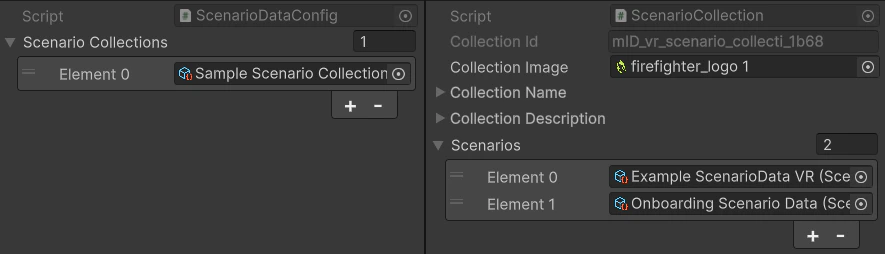
Each scenario asset is registered in Scenario Data Config collections and resolved at runtime by ScenarioSessionManager or Home UI.
Role
ScenarioData is the authoring asset that defines everything about a scenario:
- Metadata — displayed in Home UI, used for filtering/search
- Activities —
ScenarioActivityData entries matched to runtime ScenarioActivity components by RefId
- Scene loading —
SceneLoadPlan structure executed by SceneLoadPlanExecutor to load ordered multi-scene setups
- Multiplayer — role definitions and per-role scene configurations
- Backend integration —
ScenarioId (org ID) links to backend scenario records
At runtime, Scenario Manager reads this asset to configure the scenario state machine, activity sequence, and scene loading.
Inspector setup
| Field | Purpose |
|---|
| Ref Id | Stable unique identifier (auto-generated). Used for local lookups and localization keys. |
| Scenario Id | Organization scenario ID from backend (set via SetOrgScenarioId). Used for session creation. |
| Scenario Name | Display name (DynamicLocalization). Shown in Home UI. |
| Scenario Description | Description text (DynamicLocalization). Shown in scenario detail UI. |
| Scenario Image | Thumbnail texture. Displayed in Home UI scenario cards. |
| Scenario Tags | Array of ScenarioTag for filtering/categorization. |
| Time Limit Seconds | Scenario time limit. 0 = no limit. Enforced by ScenarioManager. |
| Supports Multiplayer | Enable for multiplayer scenarios. Requires role definitions and role scene mappings. |
Launch configuration
| Field | Purpose |
|---|
| Supports Assessment | Enable Assessment mode button in scenario detail UI. Training is always available. |
| Config Options | Array of ScenarioConfigOptionSO — runtime-selectable options shown before launch (e.g., difficulty, language). |
Activities
| Field | Purpose |
|---|
| Scenario Activities | Ordered array of ScenarioActivityData. Each entry defines an activity’s metadata (name, description, RefId). Runtime ScenarioActivity components match by RefId. |
Roles (multiplayer only)
| Field | Purpose |
|---|
| Scenario Roles | Array of ScenarioRole definitions. Each role has a RefId, name, description, and optional icon. Used for role selection UI and role scene mapping. |
Scene loading
Single Player Plan
| Field | Purpose |
|---|
| Preload Scenes | Array of SceneEntry loaded before the scenario scene. Index 0 loads as Single (active scene); subsequent entries load Additive. Use for shared environments, lighting, or asset preloading. |
| Scenario Scene | The main scenario logic scene (required). Loads Additive when preloads exist, Single when no preloads. |
Role Scene Mappings (multiplayer only)
| Field | Purpose |
|---|
| Role Scene Mappings | Array of RoleSceneMapping. Each entry maps a roleId (matching ScenarioRole.RefId) to a full SceneLoadPlan for that role in multiplayer. |
SceneLoadPlan structure
The SceneLoadPlan defines ordered multi-scene loading with synchronization:
[Serializable]
public struct SceneLoadPlan
{
public SceneEntry[] preloadScenes; // Loaded before scenario scene
public SceneEntry scenarioScene; // Main scenario logic scene
}
Load order
preloadScenes[0] loads as Single (becomes active scene)
- Wait for
preloadScenes[0].waitForRefIds (or 2 frames if empty)
preloadScenes[1..n] load as Additive (each waits for its RefIds)
scenarioScene loads as Additive (when preloads exist) or Single (no preloads)
SceneEntry fields
Each scene entry has:
[Serializable]
public struct SceneEntry
{
public string sceneName; // Build-settings scene name
public AssetReference sceneReference; // Addressable scene (takes priority)
public string[] waitForRefIds; // RefIds to wait for before next scene
}
| Field | Purpose |
|---|
| Scene Name | Build-settings scene name. Used when Scene Reference is not set. |
| Scene Reference | Addressable AssetReference. Takes priority over Scene Name when valid. |
| Wait For Ref Ids | Array of RefIds that must be registered in ReferenceManager before the next scene loads. Leave empty to wait two frames only. Timeout: 15 seconds. |
Code
Get scene load plan
using MolcaSDK.VR.Scenario;
// Single-player
SceneLoadPlan plan = scenarioData.GetSceneLoadPlan(ScenarioPlayerMode.Single);
// Multiplayer (specific role)
SceneLoadPlan plan = scenarioData.GetSceneLoadPlan(ScenarioPlayerMode.Multiplayer, "operator");
if (plan.IsValid)
{
Debug.Log($"Scenario scene: {plan.scenarioScene.sceneName}");
Debug.Log($"Preload count: {(plan.HasPreloads ? plan.preloadScenes.Length : 0)}");
}
// Basic info
string name = scenarioData.Name;
string description = scenarioData.Description;
float timeLimit = scenarioData.TimeLimitSeconds;
bool hasTimeLimit = scenarioData.HasTimeLimit;
// Activities
IReadOnlyList<ScenarioActivityData> activities = scenarioData.Activities;
foreach (var activity in activities)
{
Debug.Log($"Activity: {activity.Name} (RefId: {activity.RefId})");
}
// Roles (multiplayer)
if (scenarioData.SupportsMultiplayer)
{
IReadOnlyList<ScenarioRole> roles = scenarioData.Roles;
foreach (var role in roles)
{
Debug.Log($"Role: {role.Name} (RefId: {role.RefId})");
}
}
Check for legacy data
// Check if asset has unmigrated legacy scene fields
if (scenarioData.HasLegacySceneData)
{
Debug.LogWarning("Scenario has legacy scene data. Migration recommended.");
// Migrate automatically (editor only)
#if UNITY_EDITOR
bool migrated = scenarioData.MigrateLegacySceneFields();
if (migrated)
{
UnityEditor.EditorUtility.SetDirty(scenarioData);
Debug.Log("Legacy scene data migrated to SceneLoadPlan.");
}
#endif
}
Set organization scenario ID
// Called after fetching scenario metadata from backend
scenarioData.SetOrgScenarioId(orgScenarioId: 12345);
Scene loading examples
Simple single scene
// Inspector configuration:
singlePlayerPlan:
preloadScenes: (empty)
scenarioScene:
sceneName: "FireSafetyTraining"
sceneReference: null
waitForRefIds: (empty)
// Result: Loads "FireSafetyTraining" as Single
Environment + scenario (two scenes)
// Inspector configuration:
singlePlayerPlan:
preloadScenes:
[0] sceneName: "Environment_Factory"
sceneReference: null
waitForRefIds: ["factory_floor", "control_panel"]
scenarioScene:
sceneName: "Scenario_SafetyTraining"
sceneReference: null
waitForRefIds: (empty)
// Result:
// 1. Load "Environment_Factory" as Single
// 2. Wait for "factory_floor" and "control_panel" RefIds (15s timeout)
// 3. Load "Scenario_SafetyTraining" as Additive
Addressable scenes
// Inspector configuration:
singlePlayerPlan:
preloadScenes:
[0] sceneName: ""
sceneReference: AssetReference("Environments/Factory")
waitForRefIds: (empty)
scenarioScene:
sceneName: ""
sceneReference: AssetReference("Scenarios/SafetyTraining")
waitForRefIds: (empty)
// Result: Loads both scenes via Addressables
// Scene Reference takes priority over Scene Name when valid
Multiplayer with role-specific scenes
// Inspector configuration:
singlePlayerPlan:
scenarioScene:
sceneName: "Scenario_Operator_Solo"
roleSceneMappings:
[0] roleId: "operator"
plan:
preloadScenes:
[0] sceneName: "Environment_Factory"
scenarioScene:
sceneName: "Scenario_Operator_View"
[1] roleId: "supervisor"
plan:
preloadScenes:
[0] sceneName: "Environment_Factory"
scenarioScene:
sceneName: "Scenario_Supervisor_View"
// Usage:
var operatorPlan = scenarioData.GetSceneLoadPlan(ScenarioPlayerMode.Multiplayer, "operator");
var supervisorPlan = scenarioData.GetSceneLoadPlan(ScenarioPlayerMode.Multiplayer, "supervisor");
API reference
Properties
| Property | Type | Description |
|---|
RefId | string | Stable unique identifier (IReferenceable). |
ScenarioId | int | Organization scenario ID from backend. |
Name | string | Display name (localized). |
Description | string | Description text (localized). |
SupportsMultiplayer | bool | Whether multiplayer is enabled. |
Activities | IReadOnlyList<ScenarioActivityData> | Activity definitions. |
Roles | IReadOnlyList<ScenarioRole> | Role definitions (multiplayer). |
Tags | IReadOnlyList<ScenarioTag> | Scenario tags for filtering. |
Image | Texture2D | Thumbnail image. |
TimeLimitSeconds | float | Time limit in seconds (0 = no limit). |
HasTimeLimit | bool | Whether time limit is set. |
SupportsAssessment | bool | Whether Assessment mode is available. |
ConfigOptions | IReadOnlyList<ScenarioConfigOptionSO> | Launch configuration options. |
SinglePlayerPlan | SceneLoadPlan | Scene load plan for single-player. |
RoleSceneMappings | IReadOnlyList<RoleSceneMapping> | Per-role scene plans (multiplayer). |
HasLegacySceneData | bool | Whether unmigrated legacy scene fields exist. |
Methods
| Method | Returns | Description |
|---|
GetSceneLoadPlan(playerMode, roleId) | SceneLoadPlan | Returns the scene load plan for the given player mode and optional role. Returns default (invalid) if no plan is configured. |
SetOrgScenarioId(id) | void | Sets the organization scenario ID (called after backend fetch). |
MigrateLegacySceneFields() | bool | Migrates legacy flat scene fields to SceneLoadPlan. Returns true if migration was performed. Editor only. |
Initialize() | void | Initializes localization and nested data (activities, tags, roles). Called by ScenarioDataConfig. |
Troubleshooting
- Scenario not found at runtime: verify the asset is registered in Scenario Data Config collections. Check
RefId matches the lookup key.
- Scene doesn’t load: confirm
scenarioScene has either sceneName or sceneReference set. For Addressables, verify the scene is marked as Addressable and the key is valid. Check SceneLoadPlan.IsValid.
- Preload scenes load out of order: preload scenes load sequentially by array index. Index 0 always loads as Single (active scene); subsequent entries load Additive.
- Scene loads but objects missing: check
waitForRefIds on preload scenes. The executor waits up to 15 seconds for those RefIds to be registered in ReferenceManager. Check console for timeout warnings.
- Multiplayer role scene not found: verify
roleSceneMappings contains an entry with matching roleId. Check that the role’s SceneLoadPlan.IsValid.
- Activities don’t match runtime components: ensure
ScenarioActivity components in the scene have activityId matching ScenarioActivityData.RefId. Mismatches log warnings.
- Legacy scene fields not migrating: call
MigrateLegacySceneFields() in editor. Check that singlePlayerPlan is empty before migration (migration only runs when plan is invalid).
- Time limit not enforced: verify
TimeLimitSeconds > 0 and Scenario Manager is active. Time limit is checked in ScenarioManager.Update().
Unity Editor
Migration from legacy fields: If you have existing scenario assets created before the SceneLoadPlan refactoring, they contain hidden legacy fields (sceneName, singlePlayerSceneName, environmentSceneName, etc.). These are automatically migrated to singlePlayerPlan when accessed at runtime. For editor migration, call MigrateLegacySceneFields() in a custom editor script or inspector.
Addressable priority: When both sceneName and sceneReference are set on a SceneEntry, the Addressable reference takes priority. If the Addressable key is invalid, the scene load will fail — it does NOT fall back to sceneName. Set only one field to avoid confusion.