
Molca.SequenceFile:
Packages/com.molca.core/Runtime/Sequence/SequenceController.cs
When to use
UseSequenceController when you need ordered step execution with pause/resume support:
- Training scenarios — the controller drives child
Stepcomponents one-by-one, advancing on completion events. - Onboarding flows — sequential UI or tutorial steps where each must complete before the next begins.
- For VR training,
ScenarioActivityowns aSequenceControllerper activity — you rarely create one directly unless building custom flows.
Behaviour
- Owns ordered child Step components.
- State:
SequenceState—Idle,Running,Paused,Completed. - While Running, calls
UpdateStep()on the active step each frame. - Listens on EventDispatcher for
Step.Completed/Step.FullyCompletedto advance.
SequenceState):
Typical linear step chain (sibling Step children under the controller):
Parallel branches use Core step types such as ParallelStep where configured.
Unity events
OnSequenceStart, OnSequenceFinish, OnSequencePause, OnSequenceResume, OnStepChanged.
Dependencies
Uses[Inject] for EventDispatcher and ReferenceManager.
Editor tooling
Use the Sequence Visualizer (Molca → Utilities → Sequence Visualizer) to browse the step tree, change step type (edit mode, single selection), and open the CSV Step Importer.Code
API Reference
Troubleshooting
- Sequence never starts: call
StartSequence()only afterRuntimeManager.WaitForInitialization()— the controller uses[Inject]forEventDispatcherandReferenceManager. - Step never advances:
SequenceControllerlistens forStep.Completed/Step.FullyCompletedevents viaEventDispatcher. Verify the step callsComplete()and that the dispatcher is injected. - Steps run out of order: child
Stepcomponents are executed in hierarchy order (top to bottom). Reorder in the Hierarchy or use the Sequence Visualizer. - Pause doesn’t freeze step logic:
PauseSequence()stops advancement but does not pauseTime.deltaTime. Steps with timer logic must checkSequenceStatethemselves.
Related
- Step (base class) — child step components
- Core step types —
ParallelStep, etc. - Sequence Visualizer — editor window for browsing/editing step trees
- Scenario activity — VR wrapper around
SequenceController - Recipe: Set up a basic sequence — step-by-step guide to creating a SequenceController with custom steps
Unity Editor
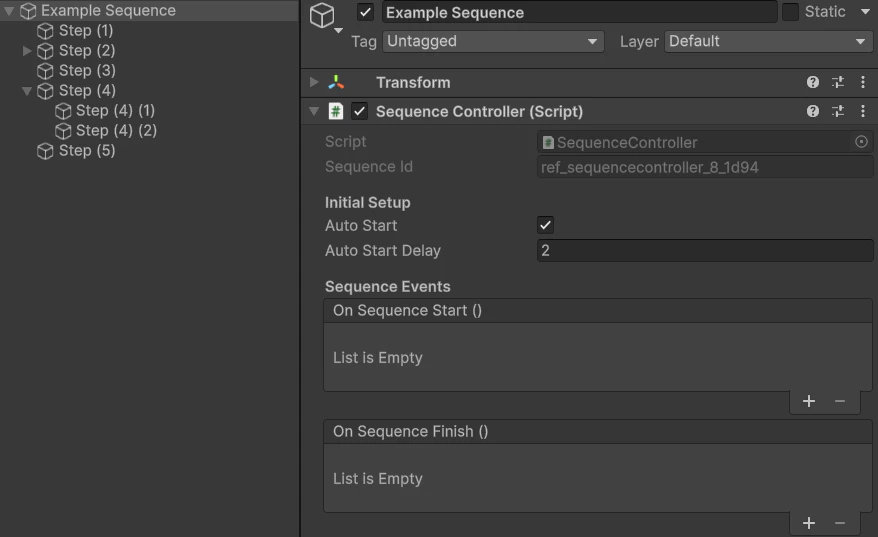
SequenceController with child Step objects in Hierarchy