
Packages/com.molca.core/Runtime/Sequence/Step/Step.csNamespace:
Molca.Sequence
When to use
Step is the base class for every node in a SequenceController tree. Use it when you need an ordered action that must complete before the next action runs. Create subclasses for custom completion logic (timers, input wait, XR interactions) or use built-in core step types.
Status
StepStatus: Inactive, Active, Completed.
Completion
IsCompleted is true only when the step is internally complete and all child steps are complete.
Identity and telemetry
RefId/RefType("Step") for the Reference system.StepId(int) — correlate with backend scoring when using Step scoring auxiliary.
Events
OnStepBegin, OnStepEnd (UnityEvent), OnStatusChanged, StartTime / EndTime.
Auxiliaries
[SerializeReference] List<StepAuxiliary> — see Core Sequence/Auxiliary/ and VR step auxiliaries.
In VR training, the StepInfo auxiliary (and subclasses for extra fields) supplies step titles used by Scenario UI task lists and modal copy — not just optional scoring/haptics.
VR subclasses
Training steps inAssets/_MolcaSDK/_VR/Scripts/Scenario/Steps/ — see the VR steps section in navigation.
Typical custom / VR step (code)
VR steps inheritStep, wire [SerializeField] for designers, subscribe in OnStepActivated, and call Complete() when the training rule is satisfied (dispatches Step.Completed / Step.FullyCompleted via EventDispatcher).
*.cs under _MolcaSDK/_VR/Scripts/Scenario/Steps/.
API Reference
Related
- Recipe: Set up a basic sequence — step-by-step guide to creating a SequenceController with custom steps
Unity Editor
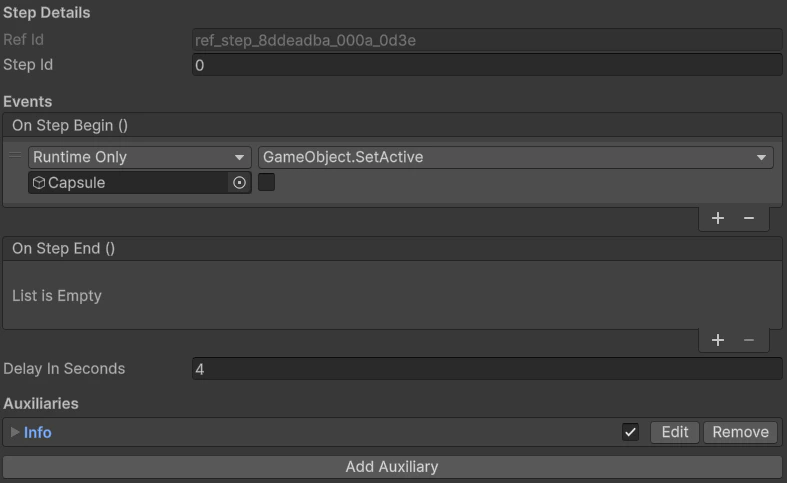
Step component on a training object