
Packages/com.molca.core/Runtime/ReferenceSystem/
When to use
Use the reference system when you need stable, late-bound connections between objects across scenes or prefab boundaries:- Cross-scene references — link a step in one scene to an interaction in another without hard
SerializeFieldreferences. - Addressable/dynamic content — resolve references after objects are loaded at runtime.
- VR step → interaction wiring —
ValveStepfinds itsValveInteractionviaSceneObjectReferencerather than a direct drag-and-drop link.
Step implements
IReferenceable<Step> with RefType "Step".
Typical pattern
- Target: add
ReferenceableComponent, set unique Ref Id. - Consumer:
SceneObjectReferencefield in Inspector, thenResolve<T>()afterRuntimeManager.WaitForInitialization().
Code
ResolveAsync<T>() so registration has finished; synchronous Resolve<T>() is fine once RuntimeManager.IsReady.
Troubleshooting
Resolve<T>()returns null: the targetReferenceableComponentmay not be registered yet. UseResolveAsync<T>()afterRuntimeManager.WaitForInitialization()instead.- Duplicate Ref Ids: each
ReferenceableComponentmust have a uniqueRefIdwithin itsRefType. Duplicates cause the first registration to win; later ones are silently ignored. - Reference breaks after scene reload:
ReferenceManagerclears registrations on scene changes. Re-resolve references inOnEnableorStartof the new scene.
Related
- Step (base class) — implements
IReferenceable<Step> - Dependency injection —
ReferenceManageris injected via[Inject] - Valve step — uses
SceneObjectReferenceto find its interaction
Unity Editor
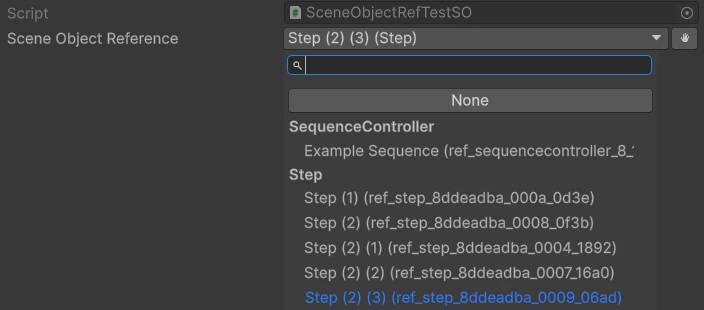
ReferenceableComponent + SceneObjectReference custom drawers