> ## Documentation Index
> Fetch the complete documentation index at: https://docs-unity.molca.id/llms.txt
> Use this file to discover all available pages before exploring further.
# Gaze Interaction Implementation
> Complete guide to implementing gaze-based inspection or verification using LookAtStep and ProgressFeedbackUI.
**Core Components:**
* `Assets/_MolcaSDK/_VR/Scripts/Scenario/Steps/LookAtStep.cs` — Step that validates gaze dwell completion
* `Assets/_MolcaSDK/_VR/Scripts/Scenario/Steps/ProgressFeedbackUI.cs` — Radial progress feedback for gaze dwell
* `Assets/_MolcaSDK/_VR/Scripts/Scenario/Listener/StepDirectionBeltController.cs` — Optional direction belt for target guidance
## When to use
Gaze Interaction — use this guide when implementing this interaction pattern in a VR training scenario.
## Role
This guide covers implementing **gaze-based interactions** (inspection, verification, examination) in VR training scenarios:
* **LookAtStep** — Step that validates player gaze on target for required duration
* **ProgressFeedbackUI** — Radial + percentage feedback showing gaze progress
* **Direction Belt** — Optional animated guide pointing to gaze target
* **Head Transform** — Auto-uses Camera.main or assigned head reference
Combined, these create a guided inspection experience where trainee looks at an object/point to verify or examine it, with visual progress feedback.
## Setup Steps
### 1. Create Gaze Target Object
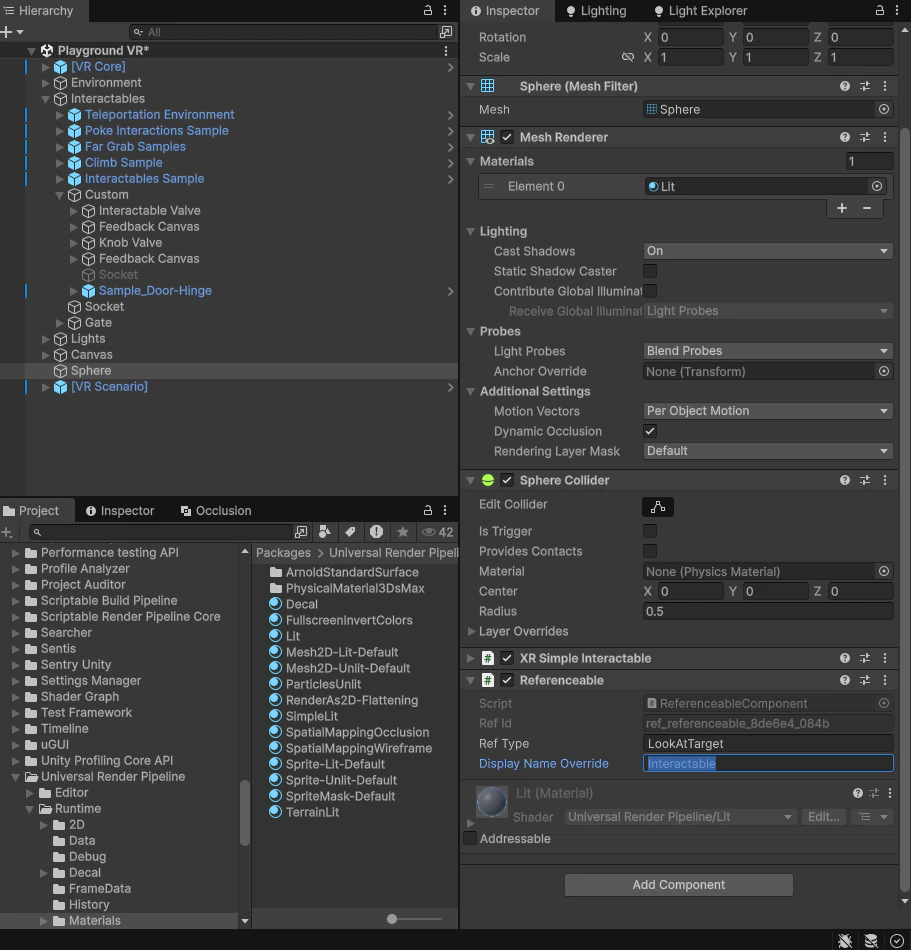
1. Create or select the object to be inspected (e.g., dashboard indicator, component, meter)
2. Add **ReferenceableComponent** to the target GameObject (auto-generates ID via `OnValidate`)
3. Note the **RefId** — you'll assign this to LookAtStep
 ### 2. Create LookAtStep for Gaze Validation
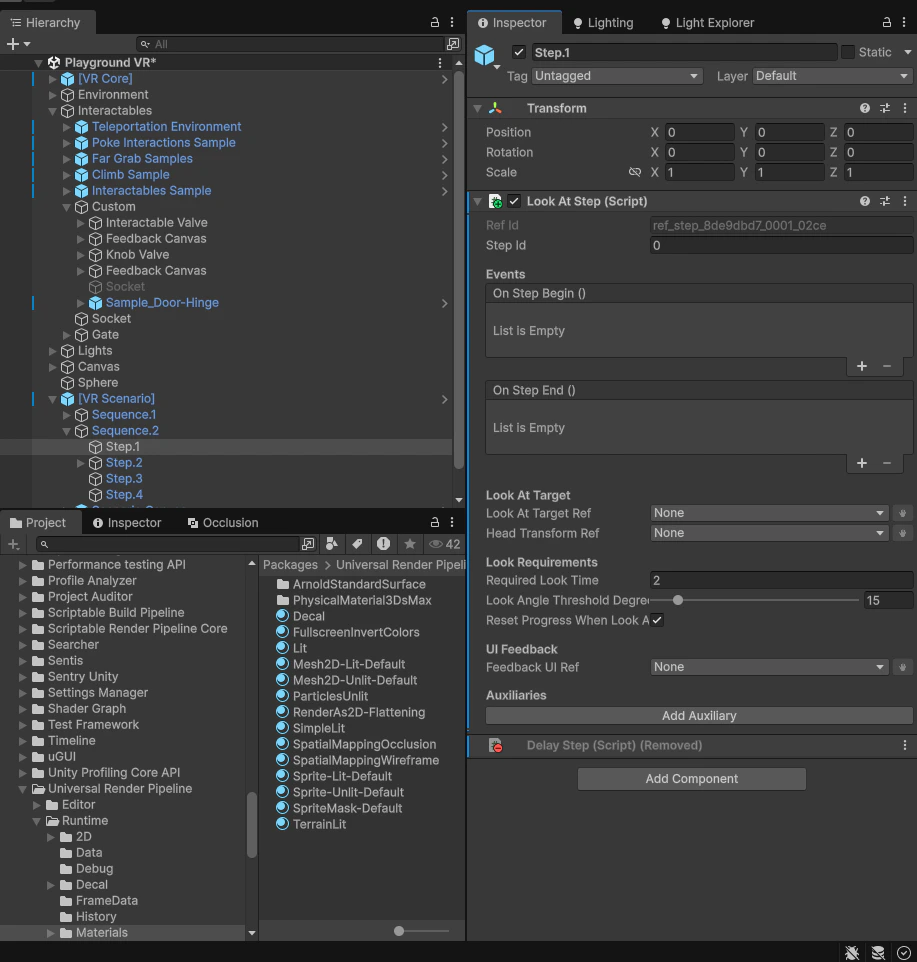
1. Create or select a GameObject to hold the **LookAtStep** component (can be parent or separate manager)
2. Add **LookAtStep** component
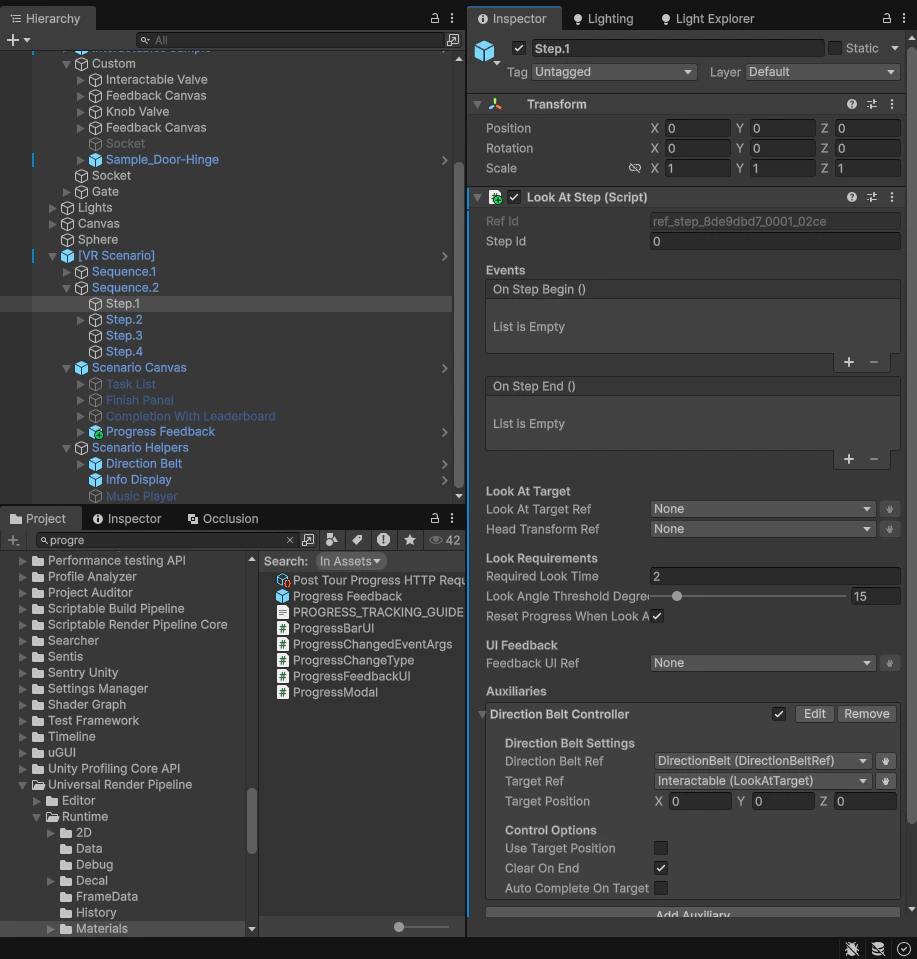
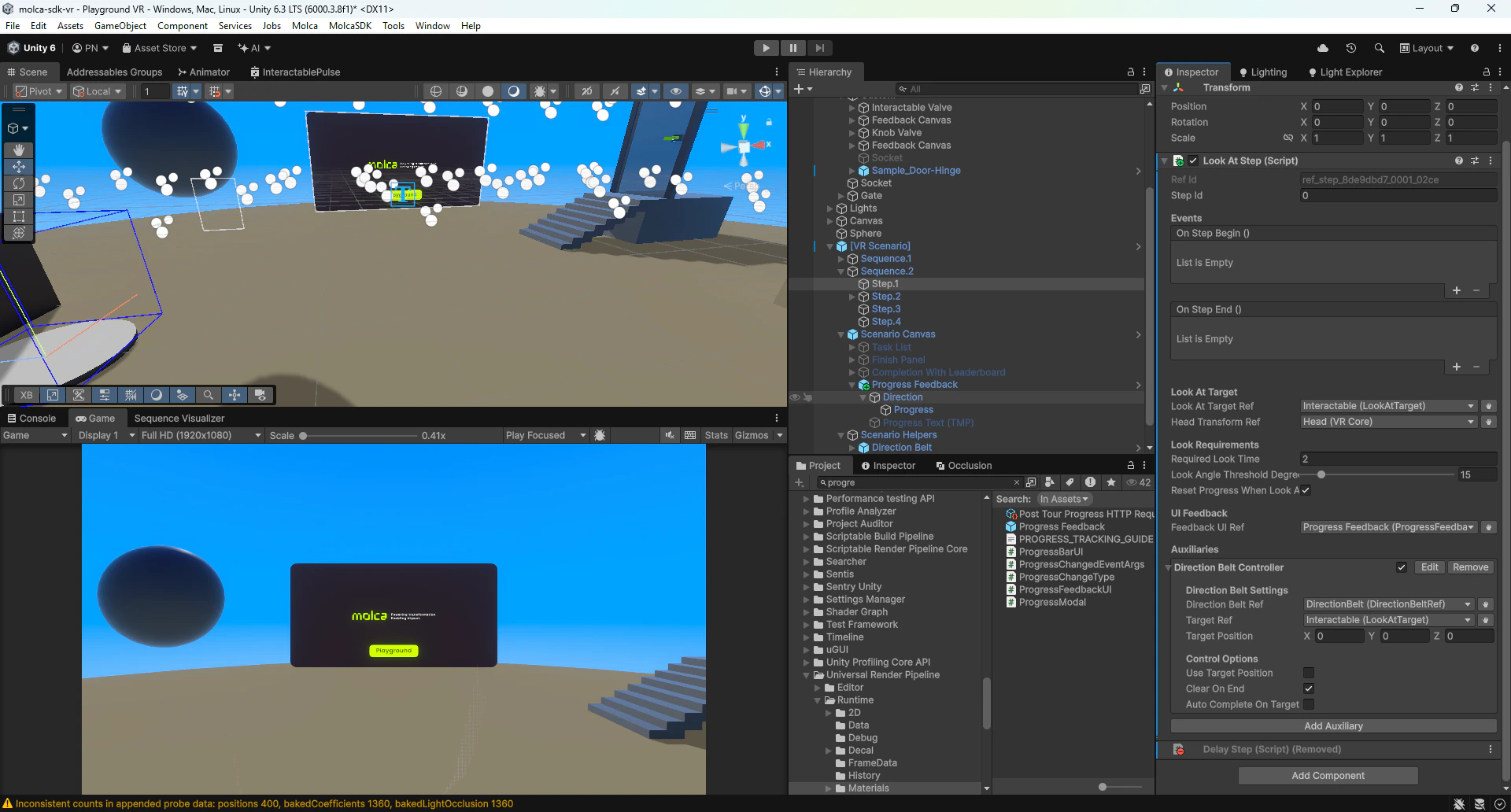
3. Configure in Inspector:
* **Look At Target Ref**: Assign the target's **ReferenceableComponent**
* **Head Transform Ref**: Assign head/camera transform (or leave empty to auto-use Camera.main)
* **Required Look Time**: Duration in seconds trainee must look (e.g., 2-3 seconds for inspection)
* **Look Angle Threshold Degrees**: Cone angle for "looking at" target (e.g., 15° for focused inspection)
* **Reset Progress When Look Away**: Enable to reset timer if trainee looks away
* **Feedback UI Ref**: Assign the ProgressFeedbackUI (next step)
### 2. Create LookAtStep for Gaze Validation
1. Create or select a GameObject to hold the **LookAtStep** component (can be parent or separate manager)
2. Add **LookAtStep** component
3. Configure in Inspector:
* **Look At Target Ref**: Assign the target's **ReferenceableComponent**
* **Head Transform Ref**: Assign head/camera transform (or leave empty to auto-use Camera.main)
* **Required Look Time**: Duration in seconds trainee must look (e.g., 2-3 seconds for inspection)
* **Look Angle Threshold Degrees**: Cone angle for "looking at" target (e.g., 15° for focused inspection)
* **Reset Progress When Look Away**: Enable to reset timer if trainee looks away
* **Feedback UI Ref**: Assign the ProgressFeedbackUI (next step)
 ### 3. Create ProgressFeedbackUI for Gaze Progress
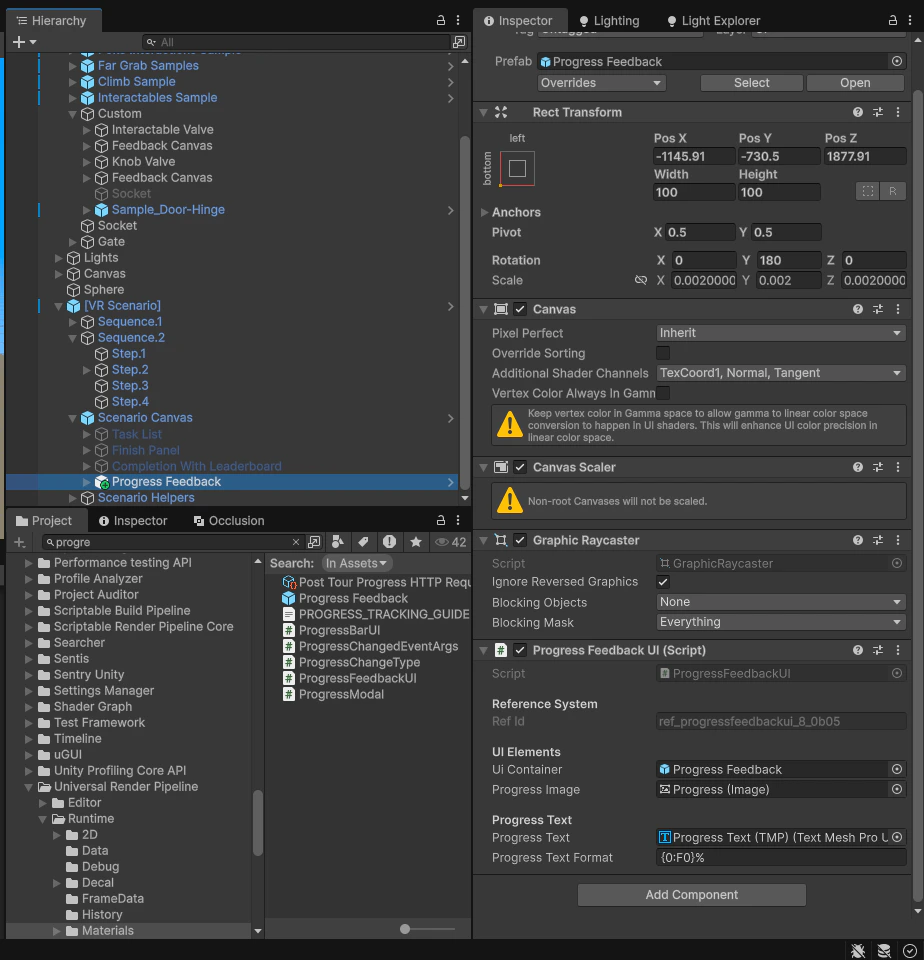
1. Create a Canvas (Screen Space or World Space) for progress feedback
2. Add **ProgressFeedbackUI** component to the Canvas or container
3. Configure in Inspector:
* **UI Container**: Drag the container/canvas GameObject (shown/hidden by step)
* **Progress Image**: Assign a radial **Image** component (Image Type: Filled, Fill Method: Radial)
* **Progress Text**: Assign a **TextMeshProUGUI** component for percentage display
* **Progress Text Format**: Format string (default: `{0:F0}%` for whole percentage)
### 3. Create ProgressFeedbackUI for Gaze Progress
1. Create a Canvas (Screen Space or World Space) for progress feedback
2. Add **ProgressFeedbackUI** component to the Canvas or container
3. Configure in Inspector:
* **UI Container**: Drag the container/canvas GameObject (shown/hidden by step)
* **Progress Image**: Assign a radial **Image** component (Image Type: Filled, Fill Method: Radial)
* **Progress Text**: Assign a **TextMeshProUGUI** component for percentage display
* **Progress Text Format**: Format string (default: `{0:F0}%` for whole percentage)
 ### 4. Optional: Add Direction Belt for Target Guidance
1. On the **LookAtStep** component, expand **Auxiliaries** section
2. Click **Add Auxiliary** → **VR/Scenario/Direction Belt Controller**
3. Configure **StepDirectionBeltController**:
* **Direction Belt Ref**: Assign DirectionBelt's **ReferenceableComponent**
* **Target Ref**: Assign gaze target's **ReferenceableComponent** (same as LookAtStep target)
* **Clear On End**: Check to clear belt when inspection completes
### 4. Optional: Add Direction Belt for Target Guidance
1. On the **LookAtStep** component, expand **Auxiliaries** section
2. Click **Add Auxiliary** → **VR/Scenario/Direction Belt Controller**
3. Configure **StepDirectionBeltController**:
* **Direction Belt Ref**: Assign DirectionBelt's **ReferenceableComponent**
* **Target Ref**: Assign gaze target's **ReferenceableComponent** (same as LookAtStep target)
* **Clear On End**: Check to clear belt when inspection completes
 ## How It Works
### LookAtStep
**File:** `Assets/_MolcaSDK/_VR/Scripts/Scenario/Steps/LookAtStep.cs`
Monitors player gaze direction and accumulates dwell time:
1. **On step start** (`OnStepActivated`): Initializes gaze tracking
* Resolves target and head transforms
* Shows ProgressFeedbackUI
* Sets dwell timer to zero
2. **Per frame** (`Update`): Checks if player is looking at target
* Calculates angle between head forward and target direction
* If angle ≤ **Look Angle Threshold**: accumulates dwell time
* If looking away and **Reset Progress When Look Away** enabled: resets timer
3. **Progress check**: When accumulated time ≥ **Required Look Time**, completes step
4. **On step end** (`OnStepCompleted`): Hides ProgressFeedbackUI
**Key fields:**
* `lookAtTargetRef` — Target to gaze at (ReferenceableComponent)
* `headTransformRef` — Head/camera transform (auto-finds Camera.main if empty)
* `requiredLookTime` — Gaze duration in seconds
* `lookAngleThresholdDegrees` — Cone angle (5–90°)
* `resetProgressWhenLookAway` — Reset timer on look-away
* `feedbackUIRef` — ProgressFeedbackUI reference
### ProgressFeedbackUI
**File:** `Assets/_MolcaSDK/_VR/Scripts/Scenario/Steps/ProgressFeedbackUI.cs`
Displays radial fill + percentage text for gaze progress:
1. **Show/Hide**: Canvas visibility controlled by LookAtStep
2. **SetProgress(0–1)**: Updates radial fill amount and text percentage
3. **IsVisible**: Property tracking UI visibility state
**Key fields:**
* `uiContainer` — Canvas/container to show/hide
* `progressImage` — Radial Image (type: Filled, method: Radial)
* `progressText` — TextMeshProUGUI for percentage
* `progressTextFormat` — Format string (`{0:F0}%` = "0%", "50%", "100%")
## Expected Results & Interaction Flow
### Idle State
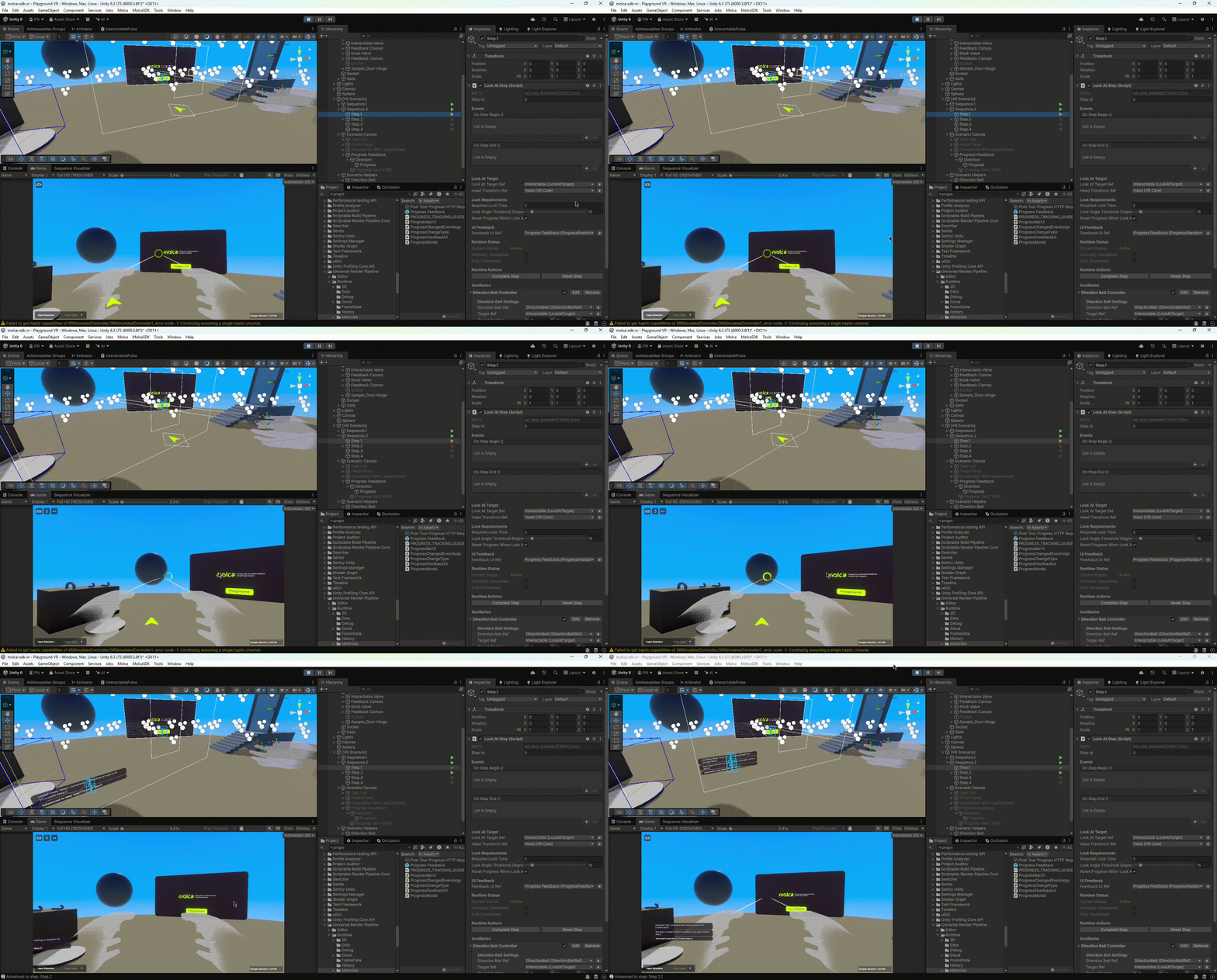
Step is not active. Target appears normal. ProgressFeedbackUI is hidden. No visual feedback.
### Step Activated (Inspection Begin)
When **LookAtStep** becomes active:
* **ProgressFeedbackUI** appears (radial fill at 0%, text "0%")
* **Direction Belt** becomes visible (optional, if configured)
* Visual feedback signals "look at target to inspect"
### Approaching Target (Looking)
Trainee's gaze enters the cone toward target:
* **Radial fill** starts increasing (0% → 100%)
* **Percentage text** updates in real time (0% → 50% → 100%)
* Progress accumulates as long as gaze stays on target
### Target Locked (Full Inspection)
Trainee maintains gaze on target for full duration:
* **Radial fill** reaches 100%
* **Text** shows "100%"
* Step completes when dwell time ≥ **Required Look Time**
### Look Away (Progress Reset)
If trainee looks away before completion:
* If **Reset Progress When Look Away** enabled:
* **Radial fill** immediately resets to 0%
* **Text** resets to "0%"
* Dwell timer resets
* If disabled:
* Progress pauses but doesn't reset
* Timer resumes when trainee looks back
### Step Complete
Gaze dwell time satisfied:
* **ProgressFeedbackUI** hides
* **Direction Belt** clears (if **Clear On End** enabled)
* Step fires `OnStepEnd` event
* Inspection complete
## Implementation (Inspector Only)
For gaze inspection with progress feedback, **no code required**. Configure entirely in Inspector:
1. **Target with ReferenceableComponent** — What to inspect
2. **LookAtStep** — Gaze validation and timer
3. **ProgressFeedbackUI** — Radial progress display
4. **Optional: StepDirectionBeltController** — Target guidance
All components work together automatically through the step lifecycle.
## Additional Auxiliaries
**LookAtStep** can use other auxiliaries for enhanced feedback:
| Auxiliary | Purpose | When to use |
| -------------------------------------------------------------- | ---------------------------------------- | --------------------------------------------- |
| **[StepInfo](/vr/steps/vr-step-auxiliaries#stepinfo)** | Title in task list ("Inspect the gauge") | Always — shows trainee what to do next |
| **[VRHapticAuxiliary](/vr/steps/vr-step-auxiliaries)** | Haptic pulses on inspection complete | For tactile feedback on successful inspection |
| **[StepScoringAuxiliary](/vr/scoring/step-scoring-auxiliary)** | Time-based scoring for inspection speed | For assessment mode |
| **[VRControllerInfoAuxiliary](/vr/steps/vr-step-auxiliaries)** | Button hints on controller | For additional guidance |
## Troubleshooting
| Issue | Solution |
| ----------------------------------- | ---------------------------------------------------------------------------------------------------------------------------------------------------------- |
| **ProgressFeedbackUI not visible** | Verify **Feedback UI Ref** assigned in LookAtStep; check UI container is active and visible in scene; ensure Canvas is on correct layer |
| **Radial fill not updating** | Confirm **Progress Image** has Image Type: Filled and Fill Method: Radial; check fill origin and direction settings |
| **Step never completes** | Verify **Required Look Time** is achievable (not too long); check **Look At Target Ref** is assigned and valid; test gaze in Play mode with head transform |
| **Gaze angle too strict** | Increase **Look Angle Threshold Degrees** (try 20–30° for wider cone); test with head tracking active |
| **Progress resets unexpectedly** | Check **Reset Progress When Look Away** is set correctly; verify head transform is accurate for gaze calculation |
| **Direction Belt points wrong way** | Confirm **Target Ref** matches LookAtStep target; verify DirectionBelt ReferenceableComponent ID is stable |
| **No gaze detection** | Ensure head transform is correctly assigned or Camera.main exists; verify target is within scene view; test with Debug.Log in LookAtStep |
## Related
* [LookAtStep](/vr/steps/look-at-step) — Gaze dwell validation and timer control
* [ProgressFeedbackUI](/vr/steps/vr-step-auxiliaries) — Radial progress display UI component
* [StepDirectionBeltController](/vr/steps/vr-step-auxiliaries) — Optional target guidance via direction belt
* [VR step auxiliaries](/vr/steps/vr-step-auxiliaries) — Overview of all StepAuxiliary types
* [Step scoring auxiliary](/vr/scoring/step-scoring-auxiliary) — Time-based scoring for inspection speed
* [VR player manager](/vr/vr-player-manager) — Disable locomotion during inspection
## Visual Examples
### Scene Setup
## How It Works
### LookAtStep
**File:** `Assets/_MolcaSDK/_VR/Scripts/Scenario/Steps/LookAtStep.cs`
Monitors player gaze direction and accumulates dwell time:
1. **On step start** (`OnStepActivated`): Initializes gaze tracking
* Resolves target and head transforms
* Shows ProgressFeedbackUI
* Sets dwell timer to zero
2. **Per frame** (`Update`): Checks if player is looking at target
* Calculates angle between head forward and target direction
* If angle ≤ **Look Angle Threshold**: accumulates dwell time
* If looking away and **Reset Progress When Look Away** enabled: resets timer
3. **Progress check**: When accumulated time ≥ **Required Look Time**, completes step
4. **On step end** (`OnStepCompleted`): Hides ProgressFeedbackUI
**Key fields:**
* `lookAtTargetRef` — Target to gaze at (ReferenceableComponent)
* `headTransformRef` — Head/camera transform (auto-finds Camera.main if empty)
* `requiredLookTime` — Gaze duration in seconds
* `lookAngleThresholdDegrees` — Cone angle (5–90°)
* `resetProgressWhenLookAway` — Reset timer on look-away
* `feedbackUIRef` — ProgressFeedbackUI reference
### ProgressFeedbackUI
**File:** `Assets/_MolcaSDK/_VR/Scripts/Scenario/Steps/ProgressFeedbackUI.cs`
Displays radial fill + percentage text for gaze progress:
1. **Show/Hide**: Canvas visibility controlled by LookAtStep
2. **SetProgress(0–1)**: Updates radial fill amount and text percentage
3. **IsVisible**: Property tracking UI visibility state
**Key fields:**
* `uiContainer` — Canvas/container to show/hide
* `progressImage` — Radial Image (type: Filled, method: Radial)
* `progressText` — TextMeshProUGUI for percentage
* `progressTextFormat` — Format string (`{0:F0}%` = "0%", "50%", "100%")
## Expected Results & Interaction Flow
### Idle State
Step is not active. Target appears normal. ProgressFeedbackUI is hidden. No visual feedback.
### Step Activated (Inspection Begin)
When **LookAtStep** becomes active:
* **ProgressFeedbackUI** appears (radial fill at 0%, text "0%")
* **Direction Belt** becomes visible (optional, if configured)
* Visual feedback signals "look at target to inspect"
### Approaching Target (Looking)
Trainee's gaze enters the cone toward target:
* **Radial fill** starts increasing (0% → 100%)
* **Percentage text** updates in real time (0% → 50% → 100%)
* Progress accumulates as long as gaze stays on target
### Target Locked (Full Inspection)
Trainee maintains gaze on target for full duration:
* **Radial fill** reaches 100%
* **Text** shows "100%"
* Step completes when dwell time ≥ **Required Look Time**
### Look Away (Progress Reset)
If trainee looks away before completion:
* If **Reset Progress When Look Away** enabled:
* **Radial fill** immediately resets to 0%
* **Text** resets to "0%"
* Dwell timer resets
* If disabled:
* Progress pauses but doesn't reset
* Timer resumes when trainee looks back
### Step Complete
Gaze dwell time satisfied:
* **ProgressFeedbackUI** hides
* **Direction Belt** clears (if **Clear On End** enabled)
* Step fires `OnStepEnd` event
* Inspection complete
## Implementation (Inspector Only)
For gaze inspection with progress feedback, **no code required**. Configure entirely in Inspector:
1. **Target with ReferenceableComponent** — What to inspect
2. **LookAtStep** — Gaze validation and timer
3. **ProgressFeedbackUI** — Radial progress display
4. **Optional: StepDirectionBeltController** — Target guidance
All components work together automatically through the step lifecycle.
## Additional Auxiliaries
**LookAtStep** can use other auxiliaries for enhanced feedback:
| Auxiliary | Purpose | When to use |
| -------------------------------------------------------------- | ---------------------------------------- | --------------------------------------------- |
| **[StepInfo](/vr/steps/vr-step-auxiliaries#stepinfo)** | Title in task list ("Inspect the gauge") | Always — shows trainee what to do next |
| **[VRHapticAuxiliary](/vr/steps/vr-step-auxiliaries)** | Haptic pulses on inspection complete | For tactile feedback on successful inspection |
| **[StepScoringAuxiliary](/vr/scoring/step-scoring-auxiliary)** | Time-based scoring for inspection speed | For assessment mode |
| **[VRControllerInfoAuxiliary](/vr/steps/vr-step-auxiliaries)** | Button hints on controller | For additional guidance |
## Troubleshooting
| Issue | Solution |
| ----------------------------------- | ---------------------------------------------------------------------------------------------------------------------------------------------------------- |
| **ProgressFeedbackUI not visible** | Verify **Feedback UI Ref** assigned in LookAtStep; check UI container is active and visible in scene; ensure Canvas is on correct layer |
| **Radial fill not updating** | Confirm **Progress Image** has Image Type: Filled and Fill Method: Radial; check fill origin and direction settings |
| **Step never completes** | Verify **Required Look Time** is achievable (not too long); check **Look At Target Ref** is assigned and valid; test gaze in Play mode with head transform |
| **Gaze angle too strict** | Increase **Look Angle Threshold Degrees** (try 20–30° for wider cone); test with head tracking active |
| **Progress resets unexpectedly** | Check **Reset Progress When Look Away** is set correctly; verify head transform is accurate for gaze calculation |
| **Direction Belt points wrong way** | Confirm **Target Ref** matches LookAtStep target; verify DirectionBelt ReferenceableComponent ID is stable |
| **No gaze detection** | Ensure head transform is correctly assigned or Camera.main exists; verify target is within scene view; test with Debug.Log in LookAtStep |
## Related
* [LookAtStep](/vr/steps/look-at-step) — Gaze dwell validation and timer control
* [ProgressFeedbackUI](/vr/steps/vr-step-auxiliaries) — Radial progress display UI component
* [StepDirectionBeltController](/vr/steps/vr-step-auxiliaries) — Optional target guidance via direction belt
* [VR step auxiliaries](/vr/steps/vr-step-auxiliaries) — Overview of all StepAuxiliary types
* [Step scoring auxiliary](/vr/scoring/step-scoring-auxiliary) — Time-based scoring for inspection speed
* [VR player manager](/vr/vr-player-manager) — Disable locomotion during inspection
## Visual Examples
### Scene Setup
 ### Interaction Flow Animation