> ## Documentation Index
> Fetch the complete documentation index at: https://docs-unity.molca.id/llms.txt
> Use this file to discover all available pages before exploring further.
# UI widgets
> Theme-aware buttons, billboard UI, progress, language, and layout helpers.
**Folder:** `Assets/_MolcaSDK/Code/Scripts/UI/`
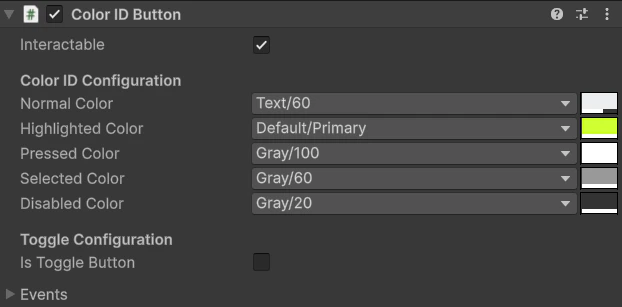
Examples: **ColorIDButton**, **ColorIDButtonGroup**, **BillboardUI**, **ProgressBarUI**, **LanguageDropdown**, **PasswordField**, **CodeInputPanel**, **BatteryStatus**, **CanvasScaleListener**, **UIScaleOption**.
## When to use
Use shared UI widgets when you need reusable, scene-agnostic UI behavior (button states, language selection, billboard labels, progress indicators) without duplicating custom MonoBehaviours per canvas.
## Inspector setup
* Add widget components under your UI canvas/prefab.
* For language flows, wire **`LanguageDropdown`** and ensure [Localization](/core/localization) is configured in [Global Settings](/setup/global-settings).
* For theme-aware buttons, keep [ColorID](/core/color-id) configured on the same object (required by `ColorIDButton`).
## Code
`ColorIDButton` and related widgets are script-driven with inspector hooks:
```csharp theme={null}
using MolcaSDK.UI;
using UnityEngine;
public class WidgetBinder : MonoBehaviour
{
[SerializeField] private ColorIDButton startButton;
private void OnEnable()
{
startButton.onClick.AddListener(OnStartClicked);
startButton.onToggleChanged.AddListener(OnToggleChanged);
}
private void OnDisable()
{
startButton.onClick.RemoveListener(OnStartClicked);
startButton.onToggleChanged.RemoveListener(OnToggleChanged);
}
private void OnStartClicked() { }
private void OnToggleChanged(bool isOn) { }
}
```
## Troubleshooting
* **Colors not updating:** verify `ColorID` exists on the same object (`ColorIDButton` has `RequireComponent`); theme changes require [ColorSchemeManager](/core/color-id) / init if you rely on scheme events.
* **Language dropdown empty:** confirm `LocalizationModule.Languages` is populated and `RuntimeManager` finished initialization.
* **Widget not reacting in play mode:** check `GraphicRaycaster`/EventSystem and interactable flags on target widget; world-space canvases need the correct **event camera** and **Sorting Layer**.
* **BillboardUI jitter or wrong facing:** confirm reference camera / XR rig; disable conflicting **`LookAt`** scripts on the same transform.
* **CodeInputPanel / PasswordField validation:** ensure submit button wires to the panel’s validation flow; VR canvas scale can shrink touch targets — check **Canvas Scaler** and colliders for world UI.
* **ProgressBarUI stuck:** driven by code or animator — verify the value property your binder writes to matches the widget’s expected range (0–1 vs 0–100).
* **BatteryStatus inaccurate:** platform-dependent; editor often reports placeholder values — test on device.
## Related
* [ColorID](/core/color-id)
* [Localization](/core/localization)
* [Shared modals](/shared/modals)
## Unity Editor