> ## Documentation Index
> Fetch the complete documentation index at: https://docs-unity.molca.id/llms.txt
> Use this file to discover all available pages before exploring further.
# Preload checks
> PreloadCheck, IPreloadCheck, FirstLaunchCheck, and VRPreloadCheck.
## Shared module
**Folder:** `Assets/_MolcaSDK/Code/Scripts/Preload/`\
**Namespace:** `MolcaSDK.Preload`
| Type | Role |
| -------------------- | ------------------------------------------------------------------------------------------------------------------------------------------------------------------------------ |
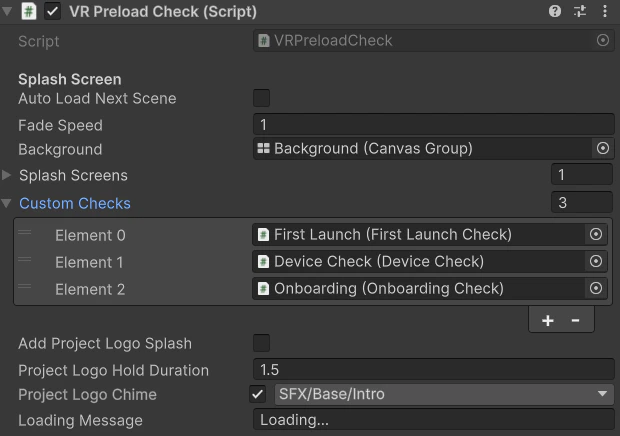
| **PreloadCheck** | Splash sequence, then **`customChecks`(list of `MonoBehaviour`)** each cast to **`IPreloadCheck`** and **`RunCheck()`** in order; optional auto advance / unload preload scene |
| **IPreloadCheck** | **`Awaitable RunCheck()`** — single async gate |
| **FirstLaunchCheck** | Example / first-run gate implementation |
## When to use
Use **`PreloadCheck`** for a **dedicated preload scene**: branding splashes, sequential gates (EULA, device, token, content), then load the main scene and optionally **unload** the preload scene. Use **`VRPreloadCheck`** for the same **child-list** pattern in VR bootstrap scenes (e.g. with [DeviceManager](/vr/device-manager)).
## VR
**`VRPreloadCheck`** — `Assets/_MolcaSDK/_VR/Scripts/UI/VRPreloadCheck.cs` — same child **`IPreloadCheck`** pattern for Preload VR scene.
## Code
Each gate implements **`IPreloadCheck`** and runs async work in **`RunCheck()`** (see **`FirstLaunchCheck`** in the same folder):
```csharp theme={null}
using MolcaSDK.Preload;
using UnityEngine;
public class DeviceCapabilityGate : MonoBehaviour, IPreloadCheck
{
public async Awaitable RunCheck()
{
await Awaitable.NextFrameAsync();
if (!HasRequiredDevice())
Debug.LogError("[Preload] Device capability check failed.");
}
private static bool HasRequiredDevice() => true; // replace with XR / platform checks
}
```
Wire **`PreloadCheck`** / **`VRPreloadCheck`** in the Hierarchy so **`customChecks`** list order matches your intended gate sequence (Inspector order is sequential — not child transform order unless you copy that into the list).
## Troubleshooting
* **Check never runs** — The component must be listed under **`customChecks`** on **`PreloadCheck`** and implement **`IPreloadCheck`**; otherwise you get **"does not implement IPreloadCheck"** warning and it is skipped.
* **Stuck on splash** — **`RunSplashScreensAsync`** / fade may hang if **`CanvasGroup`** references are wrong or **`holdDuration`** extreme; **`background`** must be valid for **`FadeOut`**.
* **Next scene wrong** — **`autoLoadNextScene`** uses **`LoadNextSceneWithCallback`** from **`SceneLoadManager`** — verify Molca scene flow / queue configuration.
* **VR duplicate logic** — Prefer [**DeviceManager**](/vr/device-manager) as **`IPreloadCheck`** via **`DeviceCheck`** rather than duplicating HTTP in a random **`MonoBehaviour`**.
## Related
* [RuntimeManager](/core/runtime-manager)
* [DeviceManager](/vr/device-manager)
* [DT startup flow](/dt/startup-flow) — broader app bootstrap patterns where applicable
## Unity Editor