> ## Documentation Index
> Fetch the complete documentation index at: https://docs-unity.molca.id/llms.txt
> Use this file to discover all available pages before exploring further.
# Scenario Data Config
> SettingModule that registers scenario collections and resolves scenario assets.
**Product:** [Molca VR SDK](/overview/platforms) (paths assume **molca-sdk-vr**). Not used by the Digital Twin SDK (`_MolcaDT`).
**Script:** `Assets/_MolcaSDK/_VR/Scripts/Scenario/Data/ScenarioDataConfig.cs`\
**Type:** `SettingModule` (listed on `GlobalSettings`)
## When to use
Use this module whenever scenario selection/content resolution is needed in VR runtime (local scenario assets, fetched scenario metadata, execution/player mode switches).
## Role
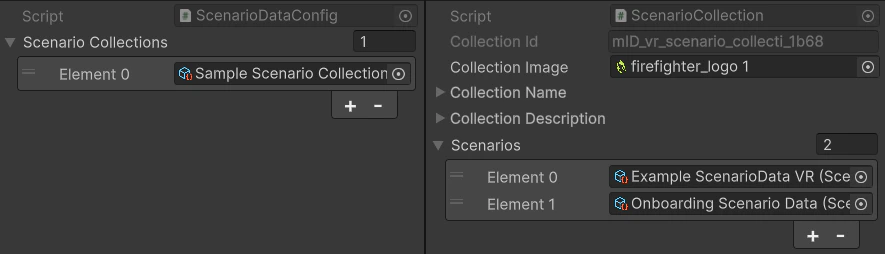
* Holds **`ScenarioCollection`** entries (local `BaseScenarioData` assets).
* Stores **execution mode** (`ScenarioExecutionMode`) and **player mode** — standalone vs connected; connected expects [Scenario session](/vr/session-loading-and-events) + valid [network config](/vr/scenario-network-config).
* After a content fetch, supports lookup by organization scenario id and related org metadata (see source for `SetFetchedContent` / `FetchedScenarios`).
* Resolves scenario scenes via **`SceneLoadPlan`** — each scenario has a `singlePlayerPlan` and optional `roleSceneMappings` for multiplayer. The plan executor loads preload scenes (environment, shared assets) before the main scenario scene, waiting for RefId registrations between each.
For a full walkthrough from a new asset to a playable scene, see [New scenario quick start](/setup/new-scenario-quickstart).
## Lookup helpers
`GetScenarioDataByName`, `GetScenarioData(string scenarioId)`, `GetScenarioDataByScenarioId`, `GetScenarioDataByOrgId`, etc. — confirm signatures in the `.cs` file.
## Troubleshooting
* **Scenario not found by id/org id:** verify scenario collections are assigned and fetched content has been set before lookup.
* **Connected mode fails at runtime:** check [Scenario network config](/vr/scenario-network-config) endpoints and auth/session flow.
* **Wrong mode behavior:** confirm `ScenarioExecutionMode` and player mode values on the module asset in the active `GlobalSettings`.
* **Scene doesn't load:** verify the `SceneLoadPlan` is configured — check that `scenarioScene` has either `sceneName` or `sceneReference` set. For Addressables, confirm the scene is marked as Addressable and the key is valid.
* **Preload scenes load out of order:** preload scenes load sequentially by array index. Index 0 always loads as Single (active scene); subsequent entries load Additive.
* **Scene loads but objects missing:** check `waitForRefIds` on preload scenes — the executor waits for those RefIds to be registered in `ReferenceManager` before loading the next scene. Timeout is 15 seconds; check console for warnings.
## Related
* [Scenario Data](/vr/scenario-data) — ScriptableObject asset that defines scenario metadata and scene loading
* [Recipe: Set up a VR scenario](/recipes/setup-vr-scenario) — step-by-step guide for creating a complete VR training scenario
* [VR assets and scenes](/vr/sdk-assets-and-scenes) — how catalog data relates to Unity scenes
* [Session loading and events](/vr/session-loading-and-events)
* [New scenario quick start](/setup/new-scenario-quickstart)
* [Scenario manager](/vr/scenario-manager)
## Unity Editor