> ## Documentation Index
> Fetch the complete documentation index at: https://docs-unity.molca.id/llms.txt
> Use this file to discover all available pages before exploring further.
# SequenceController
> Ordered step execution, pause/resume, and step advancement.
**Namespace:** `Molca.Sequence`\
**File:** `Packages/com.molca.core/Runtime/Sequence/SequenceController.cs`
## When to use
Use `SequenceController` when you need **ordered step execution** with pause/resume support:
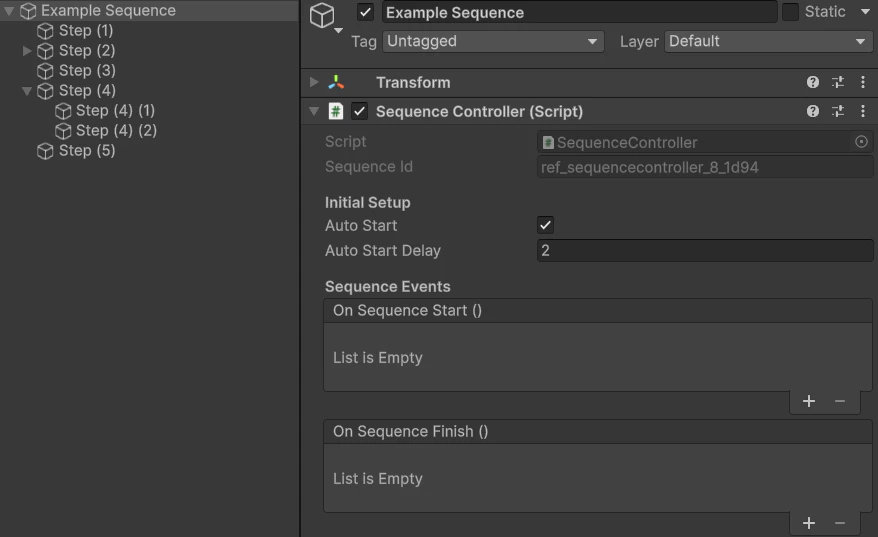
* **Training scenarios** — the controller drives child `Step` components one-by-one, advancing on completion events.
* **Onboarding flows** — sequential UI or tutorial steps where each must complete before the next begins.
* For VR training, `ScenarioActivity` owns a `SequenceController` per activity — you rarely create one directly unless building custom flows.
## Behaviour
* Owns ordered child [Step](/core/step) components.
* **State:** `SequenceState` — `Idle`, `Running`, `Paused`, `Completed`.
* While **Running**, calls `UpdateStep()` on the active step each frame.
* Listens on [EventDispatcher](/core/event-dispatcher) for `Step.Completed` / `Step.FullyCompleted` to advance.
**Controller state** (`SequenceState`):
```mermaid theme={null}
stateDiagram-v2
[*] --> Idle
Idle --> Running: StartSequence
Running --> Paused: PauseSequence
Paused --> Running: ResumeSequence
Running --> Completed: all steps finished
Completed --> [*]
```
**Typical linear step chain** (sibling [Step](/core/step) children under the controller):
```mermaid theme={null}
flowchart LR
A[Step 1] --> B[Step 2] --> C[Step 3]
```
Parallel branches use [Core step types](/core/core-step-types) such as `ParallelStep` where configured.
## Unity events
`OnSequenceStart`, `OnSequenceFinish`, `OnSequencePause`, `OnSequenceResume`, `OnStepChanged`.
## Dependencies
Uses `[Inject]` for `EventDispatcher` and `ReferenceManager`.
## Editor tooling
Use the [Sequence Visualizer](/core/sequence-visualizer) (**Molca → Utilities → Sequence Visualizer**) to browse the step tree, **change step type** (edit mode, single selection), and open the [CSV Step Importer](/core/csv-step-importer).
## Code
```csharp theme={null}
using Molca.Sequence;
using UnityEngine;
public class RunOnKey : MonoBehaviour
{
[SerializeField] private SequenceController sequence;
private void Update()
{
if (Input.GetKeyDown(KeyCode.Space))
sequence.StartSequence();
}
}
```
Prefer driving the controller from your scenario / training flow rather than input in production.
## API Reference
| Method | Signature | Description |
| --------------------- | ---------------------------- | ------------------------------------------------------------------------------------------ |
| `StartSequence` | `void StartSequence()` | Begin sequence execution from the first step — sets state to `Running` |
| `PauseSequence` | `void PauseSequence()` | Pause the running sequence — sets state to `Paused`, stops step advancement |
| `ResumeSequence` | `void ResumeSequence()` | Resume a paused sequence — sets state back to `Running` |
| `StopSequence` | `void StopSequence()` | Stop the sequence and reset to `Idle` state |
| `RestartSequence` | `void RestartSequence()` | Stop and immediately restart the sequence from the first step |
| `CompleteCurrentStep` | `void CompleteCurrentStep()` | Manually complete the currently active step and advance to the next |
| `CurrentStep` | `Step CurrentStep { get; }` | Read-only property returning the currently active step, or null if sequence is not running |
## Troubleshooting
* **Sequence never starts:** call `StartSequence()` only after `RuntimeManager.WaitForInitialization()` — the controller uses `[Inject]` for `EventDispatcher` and `ReferenceManager`.
* **Step never advances:** `SequenceController` listens for `Step.Completed` / `Step.FullyCompleted` events via `EventDispatcher`. Verify the step calls `Complete()` and that the dispatcher is injected.
* **Steps run out of order:** child `Step` components are executed in **hierarchy order** (top to bottom). Reorder in the Hierarchy or use the [Sequence Visualizer](/core/sequence-visualizer).
* **Pause doesn't freeze step logic:** `PauseSequence()` stops advancement but does **not** pause `Time.deltaTime`. Steps with timer logic must check `SequenceState` themselves.
## Related
* [Step (base class)](/core/step) — child step components
* [Core step types](/core/core-step-types) — `ParallelStep`, etc.
* [Sequence Visualizer](/core/sequence-visualizer) — editor window for browsing/editing step trees
* [Scenario activity](/vr/scenario-activity) — VR wrapper around `SequenceController`
* [Recipe: Set up a basic sequence](/recipes/setup-basic-sequence) — step-by-step guide to creating a SequenceController with custom steps
## Unity Editor