> ## Documentation Index
> Fetch the complete documentation index at: https://docs-unity.molca.id/llms.txt
> Use this file to discover all available pages before exploring further.
# Core step types
> ParallelStep, AnimationStep, IntCounterStep, FloatListenerStep, and other non-VR steps.
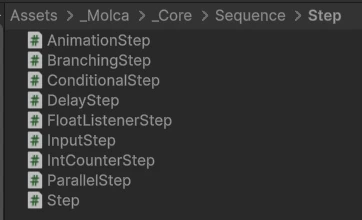
**Folder:** `Packages/com.molca.core/Runtime/Sequence/Step/`
Molca Core ships these `Step` subclasses beyond the base [Step](/core/step):
| Type | Description |
| --------------------------------------------- | ----------------------------------------------------------------------------------------- |
| **[ParallelStep](#)** | Run child steps concurrently. Completes when configurable completion rules are met. |
| **[AnimationStep](#)** | Plays a Unity `Animation` or `Animator` clip on activation, completes when the clip ends. |
| **[DelayStep](/core/delay-step)** | Waits a configurable duration (pauses correctly on sequence pause). |
| **[IntCounterStep](#)** | Tracks an integer counter; completes when the count reaches a target value. |
| **[FloatListenerStep](#)** | Monitors a float value; completes when it crosses a threshold. |
| **[BranchingStep](/core/branching-step)** | Activates exactly one child step from an array by index at runtime. |
| **[ConditionalStep](/core/conditional-step)** | Binary true/false branch — activates `trueStep` or `falseStep` child. |
| **[InputStep](#)** | Waits for a configurable input action (key, button, axis). |
VR-specific step scripts live under `_MolcaSDK/_VR/Scripts/Scenario/Steps/` (see navigation).
## Code
Core steps are plain **`Step`** subclasses. Example shape (names vary — open `ParallelStep.cs` etc. in `_Core/Sequence/Step/`):
```csharp theme={null}
using Molca.Sequence;
using UnityEngine;
public class TimedGateStep : Step
{
[SerializeField] private float delay = 1f;
protected override void OnStepActivated()
{
base.OnStepActivated();
Invoke(nameof(Complete), delay);
}
}
```
For authoring nested graphs in-editor, use [Sequence Visualizer](/core/sequence-visualizer) and [CSV Step Importer](/core/csv-step-importer).
## Unity Editor